QuestionQ179

VerifiedManage Azure identities and governance

You have an Azure subscription that contains the users shown in the following table.
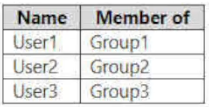
Question Image

The groups are configured as shown in the following table.

Question Image

You have a resource group named RG1 as shown in the following exhibit.
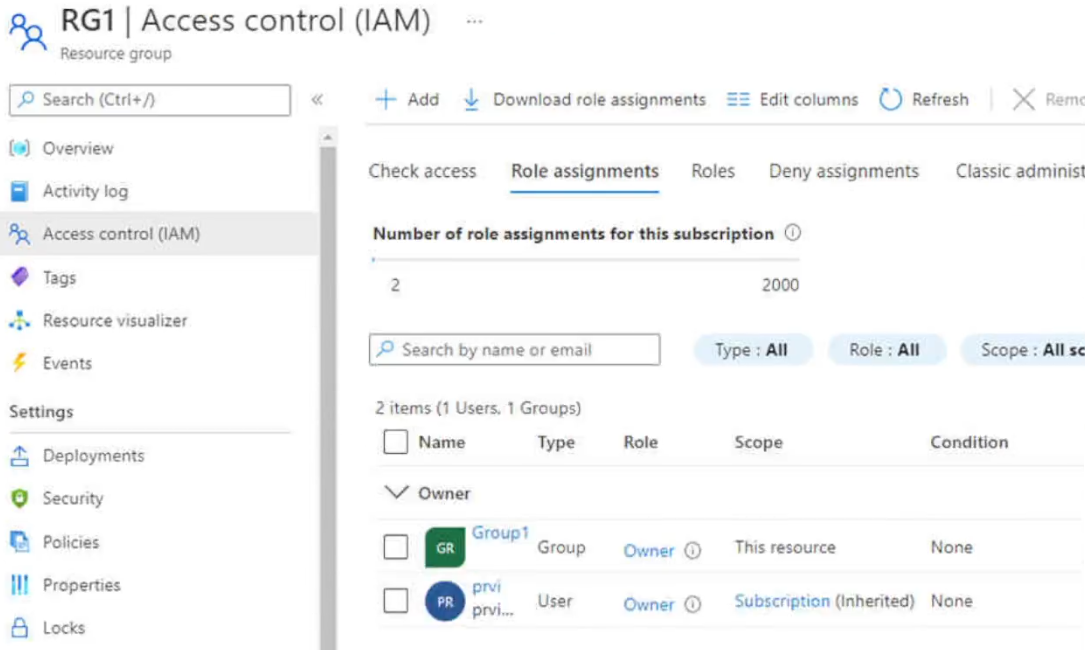
Question Image

For each of the following statements, select Yes if the statement is true. Otherwise, select No.

Yes or No
StatementsYesNo
You can assign User2 the Owner role for RG1 by adding Group2 as a member of Group1.
You can assign User3 the Owner role for RG1 by adding Group3 as a member of Group1.
You can assign User3 the Owner role for RG1 by assigning the Owner role to Group3 for RG1.
Explanation

Group1 already holds the Owner role on RG1, and the groups table shows Group1 has "Microsoft Entra roles can be assigned to the group" enabled, which makes it a role-assignable group. Role-assignable groups do not support nesting - a group can't be added as a member of a role-assignable group - so adding Group2 or Group3 as a member of Group1 will not extend Owner access to User2 or User3, regardless of whether the added group is a security group or a Microsoft 365 group. Because Group3 is role-assignable, it must be security-enabled (isAssignableToRole requires securityEnabled = true), so it can receive an Azure RBAC role assignment. Assigning the Owner role to Group3 on RG1 grants User3, as a member of Group3, the Owner role.

Learn more

Community Discussion

No comments yet. Be the first to start the discussion!