About the Exam

Associate-level Microsoft exam, currently in beta, for administrators who run Microsoft 365 alongside Copilot and agents. It covers tenant and workload management, Entra identity and Conditional Access, Defender for Office 365, Purview data protection, Copilot readiness, and agent governance with Agent 365. It leads to the Microsoft 365 and AI Services Administrator Associate certification. Passing demonstrates the ability to run these services securely at enterprise scale.

Exam Topics

  • Configure and manage Microsoft 365 tenants and workloads20–25%
  • Govern and secure Microsoft 365 tenants and workloads40–45%
  • Manage and secure AI services in Microsoft 36535–40%

How to Use This Practice Exam

  1. Browse — Read each question, select your answer, and reveal the explanation.
  2. Exam Mode — Simulate real exam conditions with a timed session and score report.
  3. Learn Mode — Spaced repetition schedules questions you struggle with for long-term retention.

Download the Full Exam PDF

Get every question and answer in a clean, printable PDF built for offline study. Purchase once, keep permanent access, and re-download the latest version anytime.

Last updated September 17, 2026 at 3:13 PM

Topic filter
Retired questions
Question sort
Questions per page

QuestionQ5

Configure and manage Microsoft 365 tenants and workloads

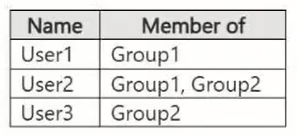
For each statement, select Yes if it is true. Otherwise, select No.
Question Image

Yes or No
StatementsYesNo
User1 can send a maximum of 150 email messages per day.
User2 can send a maximum of 50 email messages per day.
User3 can send a maximum of 100 email messages per day.
Explanation

Custom outbound spam policies are evaluated by priority, with 0 being highest, and only the first applicable policy applies. An excluded user or group does not receive that policy. User1 receives the higher-priority Group1 limit of 100, so 150 is incorrect. User2 is excluded from that policy through Group2 and then receives the 50-message Group2 policy. User3 is excluded from the custom policy that would otherwise apply, so the claimed 100-message limit is incorrect.

Learn more

Community Discussion

No comments yet. Be the first to start the discussion!

QuestionQ11

Manage and secure AI services in Microsoft 365

You have a Microsoft 365 subscription.

All users have Microsoft 365 Copilot licenses assigned. You plan to deploy Microsoft 365 Apps for enterprise to users’ devices.

You must ensure that users can use Microsoft 365 Copilot in Microsoft Word and Excel. The solution must minimize the frequency of Microsoft 365 Apps feature updates.

Which update channel should you use?

Community Discussion

No comments yet. Be the first to start the discussion!

QuestionQ15

Govern and secure Microsoft 365 tenants and workloads

HOTSPOT -

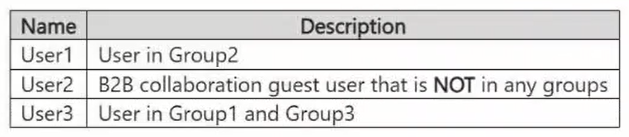
You have a Microsoft 365 E5 tenant containing a Microsoft SharePoint site named Site1. Site1 contains the files listed in the following table.
Question Image

You create a sensitivity label named Sensitivity1 and an auto-label policy with the following configuration:

  • Name: AutoLabel1
  • Label to auto-apply: Sensitivity1
  • Choose locations where you want to apply the label: Site1

The Define content that contains sensitive info settings for AutoLabel1 are shown in the following exhibit.

Question Image

For each of the following statements, select Yes if the statement is true. Otherwise, select No.

Yes or No
StatementsYesNo
User2 is prevented from accessing Payroll
User1 must complete multifactor authentication (MFA) before accessing Payroll
User3 must complete multifactor authentication (MFA) before accessing Payroll
Explanation

Conditional Access user and group exclusions override inclusions for a policy. User2 is included by CA2 and is not excluded, so CA2 blocks access to Payroll. User1 is also included by CA2 and is not excluded, so access is blocked rather than granted after MFA. User3 is excluded from CA1 through Group3 and excluded from CA2 through Group1 and Group3, so neither policy imposes MFA.

Learn more

Community Discussion

No comments yet. Be the first to start the discussion!

QuestionQ19

Manage and secure AI services in Microsoft 365
Question Image

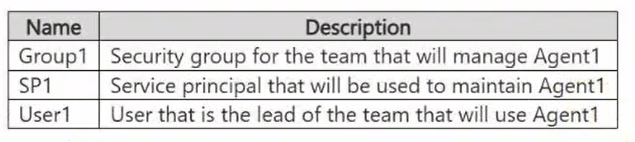
Each action may be used once, more than once, or not at all.

Drag & Drop
Lifecycle accountability:
Automated maintenance:
Explanation

Sponsors are the business representatives accountable for an agent’s purpose and lifecycle decisions, so User1 should be the sponsor. Owners administer agent configuration and operations; assigning SP1 as an owner enables automated management by that service principal.

Learn more

Community Discussion

No comments yet. Be the first to start the discussion!

QuestionQ24

Manage and secure AI services in Microsoft 365

You have a Microsoft 365 subscription with at least one paid Microsoft 365 Copilot license. Microsoft 365 Copilot is configured as shown in the following table.

The subscription includes the users shown in the following table.
Question Image

Question Image

Drag & Drop
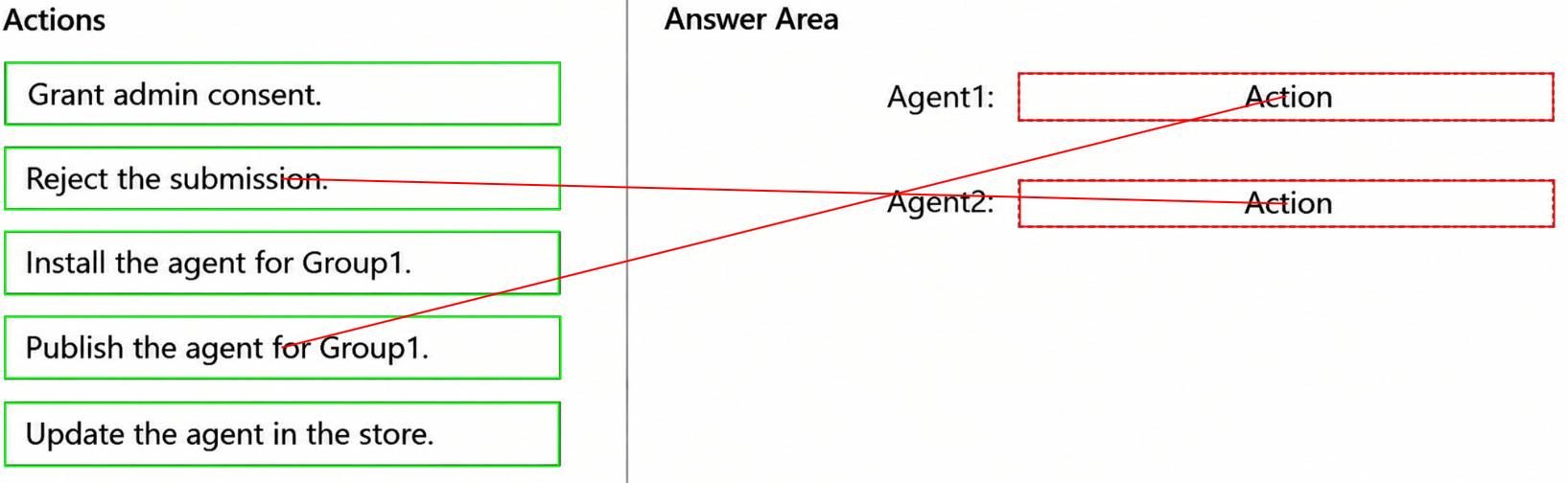
Agent1:
Agent2:
Explanation

Agent1 can be published for Group1 because its members are granted rights to the encrypted Forecast content, and its creator has a paid Microsoft 365 Copilot license. Agent2's submission must be rejected because its creator has Microsoft 365 Copilot Chat only; Agent Builder capabilities using Microsoft 365 organizational knowledge require a Microsoft 365 Copilot add-on license (or applicable Copilot Credits/pay-as-you-go entitlement).

Learn more

Community Discussion

No comments yet. Be the first to start the discussion!

That's the end of the preview

It's free

100% of the questions are free for all users.
No strings attached.
Topics covered
Configure and manage Microsoft 365 tenants and workloadsGovern and secure Microsoft 365 tenants and workloadsManage and secure AI services in Microsoft 365
Know a question that should be here? Contribute to this exam
Back home