About the Exam

This retired Fortinet NSE 7 exam covered the FortiSASE platform, including configuration, operation, troubleshooting, and operational scenarios. It was intended for network and security professionals responsible for designing, administering, and supporting global infrastructure built around multisite, remote-user FortiSASE deployments. Passing demonstrated applied knowledge of FortiSASE and its integration with SD-WAN, FortiGate devices, and FortiManager.

Exam Topics

  • Advanced Deployment Features20%
  • SPA20%
  • Endpoint Management20%
  • Central Management, Central Analytics, and Security Operations20%
  • Troubleshooting20%

How to Use This Practice Exam

  1. Browse — Read each question, select your answer, and reveal the explanation.
  2. Exam Mode — Simulate real exam conditions with a timed session and score report.
  3. Learn Mode — Spaced repetition schedules questions you struggle with for long-term retention.

Download the Full Exam PDF

Get every question and answer in a clean, printable PDF built for offline study. Purchase once, keep permanent access, and re-download the latest version anytime.

Last updated April 22, 2026 at 12:47 PM

Topic filter
Retired questions
Question sort

QuestionQ1

Central Management, Central Analytics, and Security Operations

What is needed to enable the MSSP feature in FortiSASE?

  • A Multi-tenancy must be enabled on the FortiSASE portal.
  • B MSSP user accounts and permissions must be configured on the FortiSASE portal.
  • C The MSSP add-on license must be applied to FortiSASE.
  • D Role-based access control (RBAC) must be assigned to identity and access management (IAM) users using the FortiCloud IAM portal.
Explanation

The FortiSASE MSSP portal relies on FortiCloud IAM users and the FortiCloud organizational-unit structure. RBAC assignments in FortiCloud IAM establish the permissions needed for IAM users to access and manage MSSP tenants.

Learn more

Community Discussion

No comments yet. Be the first to start the discussion!

QuestionQ2

Troubleshooting

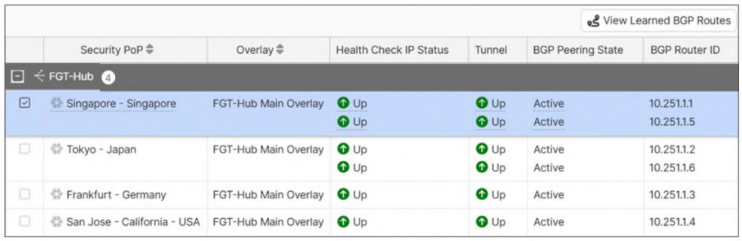
Refer to the exhibit.

Question Image

An SPA service connection is having connectivity issues. Which configuration setting should the administrator verify and correct first?

  • A Remote Gateway
  • B BGP Peer IP
  • C Network overlay ID
  • D Authentication Method
Explanation

The BGP Peer IP must be the IP address used as the BGP peer ID on the FortiGate hub. SPA uses BGP over its IPsec overlays to exchange routes between security PoPs and the networks behind the hub; therefore, an incorrect peer IP can cause service-connection routing failures even when the underlying tunnel is up. Fortinet documents this setting as the hub IP address used as the BGP peer ID.

Learn more

Community Discussion

No comments yet. Be the first to start the discussion!

QuestionQ3

Endpoint Management

What is the role of security posture tagging in ZTNA?

  • A To assign usernames to different devices for security logs
  • B To categorize devices and users based on their role in the organization
  • C To provide granular access control based on the compliance status of devices and users
  • D To ensure that all devices and users are monitored continuously
Explanation

Security posture tags identify endpoint conditions and can be used in dynamic ZTNA policy rules. They enable access decisions to be applied according to device security posture or compliance context, providing granular control over application access.

Learn more

Community Discussion

No comments yet. Be the first to start the discussion!

QuestionQ4

Endpoint Management

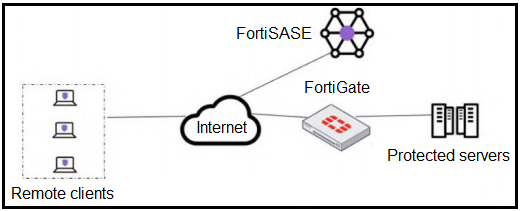
Refer to the exhibit.

Question Image

A customer must implement device-posture checks for remote endpoints when they access the protected server. They also require TCP traffic between the remote endpoints and protected servers to be processed by FortiGate.

In this scenario, which two configurations meet these requirements?

Choose two
  • A Configure ZTNA tags on FortiGate.
  • B Configure FortiGate as a zero trust network accesss (ZTNA) access proxy.
  • C Configure ZTNA servers and ZTNA policies on FortiGate.
  • D Configure private access policies on FortiSASE with ZTNA.
Explanation

A FortiGate ZTNA access proxy terminates the secure client connection and proxies TCP traffic to protected resources, allowing FortiGate to process that traffic. ZTNA server definitions and ZTNA policies are required configuration components of the FortiGate ZTNA application gateway and enforce access using endpoint identity and security-posture context.

Learn more

Community Discussion

No comments yet. Be the first to start the discussion!

QuestionQ5

Central Management, Central Analytics, and Security Operations

Which authentication method supersedes any other user authentication that was previously configured on FortiSASE?

  • A Local
  • B SSO
  • C RADIUS
  • D MFA
Explanation

Enabling SSO in FortiSASE overrides previously configured user-authentication methods, such as local authentication and RADIUS.

Community Discussion

No comments yet. Be the first to start the discussion!
Know a question that should be here? Contribute to this exam

Back home