QuestionQ10

Authentication

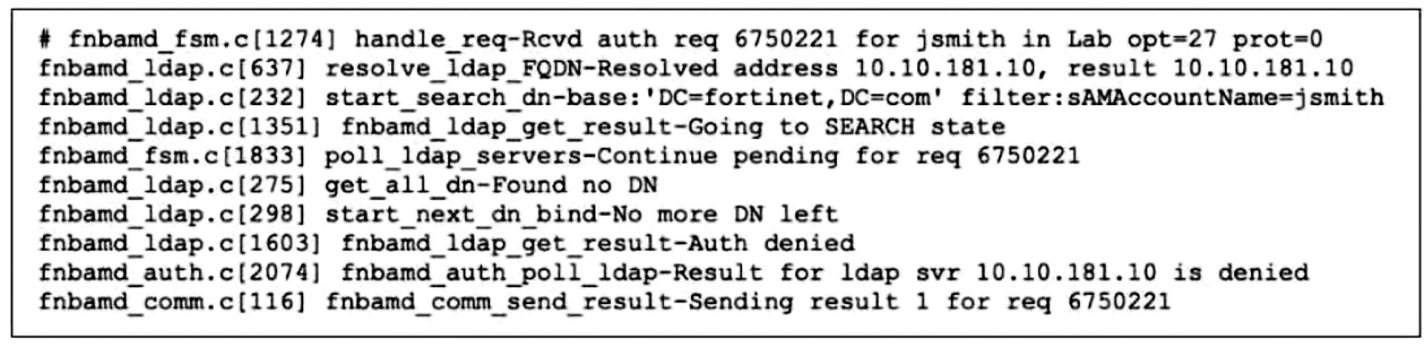
Refer to the exhibit.

A partial output from the real-time LDAP debug is displayed.
Question Image

Which two actions can the administrator perform to resolve this problem?

Choose two
  • A Ensure the account is active.
  • B Ensure the user is providing the correct user credentials.
  • C Ensure the user is a member of at least one AD group to ensure that step 4 of the LDAP authentication process is successful.
  • D Ensure the user logs in using ‘John Smith’ not ‘jsmith’.
Explanation

FortiGate uses the configured Common Name Identifier to search for the connecting LDAP user, and the Distinguished Name defines where user account entries are searched. A failed user-DN lookup is resolved by ensuring that the AD account is enabled and that the user supplies the valid credentials for the configured account identifier. AD group membership is evaluated only after the user can be found and authenticated; it cannot correct an unsuccessful user lookup. With sAMAccountName configured as the identifier, the account logon name—not the person’s display name—is the appropriate lookup value. Fortinet: Configuring an LDAP server

Learn more

Community Discussion

No comments yet. Be the first to start the discussion!