About the Exam

This exam evaluates knowledge of Fortinet solutions in enterprise security infrastructure environments and tests the ability to diagnose and troubleshoot enterprise firewall solutions in FortiOS 7.6. It is intended for network and security professionals responsible for administering and supporting enterprise environments built around many FortiGate devices. Fortinet lists the exam as last delivered on July 15, 2026, and passing it maps to the NSE 6 in Secure Networking certification.

Exam Topics

  • System troubleshooting40%
  • Authentication20%
  • Security profiles20%
  • Routing15%
  • VPN5%

How to Use This Practice Exam

  1. Browse — Read each question, select your answer, and reveal the explanation.
  2. Exam Mode — Simulate real exam conditions with a timed session and score report.
  3. Learn Mode — Spaced repetition schedules questions you struggle with for long-term retention.

Download the Full Exam PDF

Get every question and answer in a clean, printable PDF built for offline study. Purchase once, keep permanent access, and re-download the latest version anytime.

Last updated March 17, 2026 at 1:14 PM

Topic filter
Retired questions
Question sort

QuestionQ1

System troubleshooting

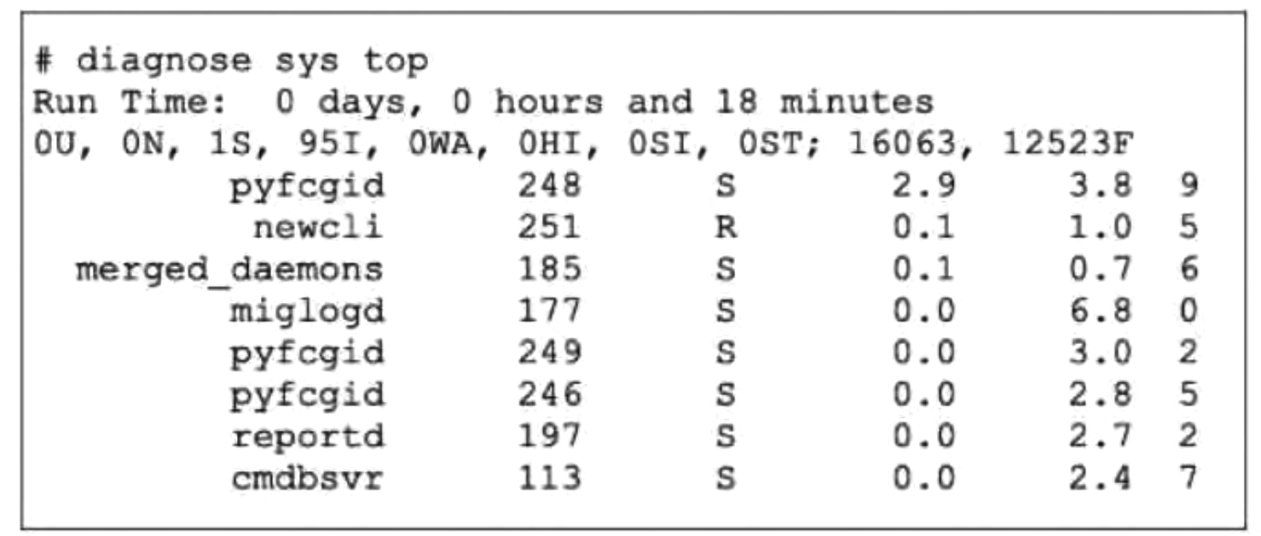
Refer to the exhibit.

Question Image

Which three items of information are provided by the diagnose sys top command?

Choose three
  • A The miglogd daemon is running on CPU core ID 0.
  • B The cmdbsvr process is occupying 2.4% of the total user memory space.
  • C The diagnose sys top command has been running for 18 minutes.
  • D If the newcli daemon continues to be in the R state, it will need to be manually restarted.
  • E The miglogd daemon would be on top of the list, if the administrator pressed m on the keyboard.
Explanation

FortiOS diagnose sys top reports each process’s CPU and memory usage, and in this output its final column is the CPU core index. Thus, miglogd is associated with CPU core 0 and cmdbsvr is using 2.4% memory. The m key sorts the process list by memory usage; because miglogd has the largest displayed memory value, 6.8%, it would be listed first. Run Time indicates FortiOS uptime, while R denotes a running process state and does not by itself require a restart.

Learn more

Community Discussion

No comments yet. Be the first to start the discussion!

QuestionQ2

System troubleshooting

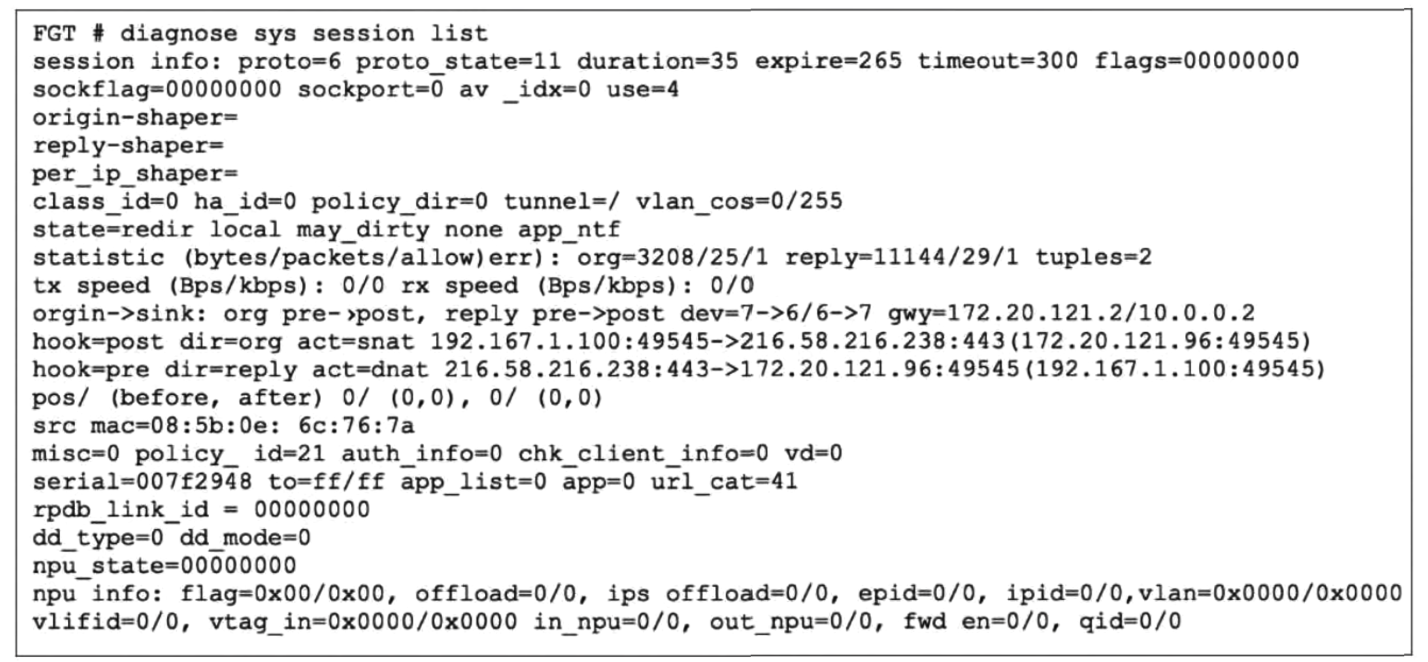
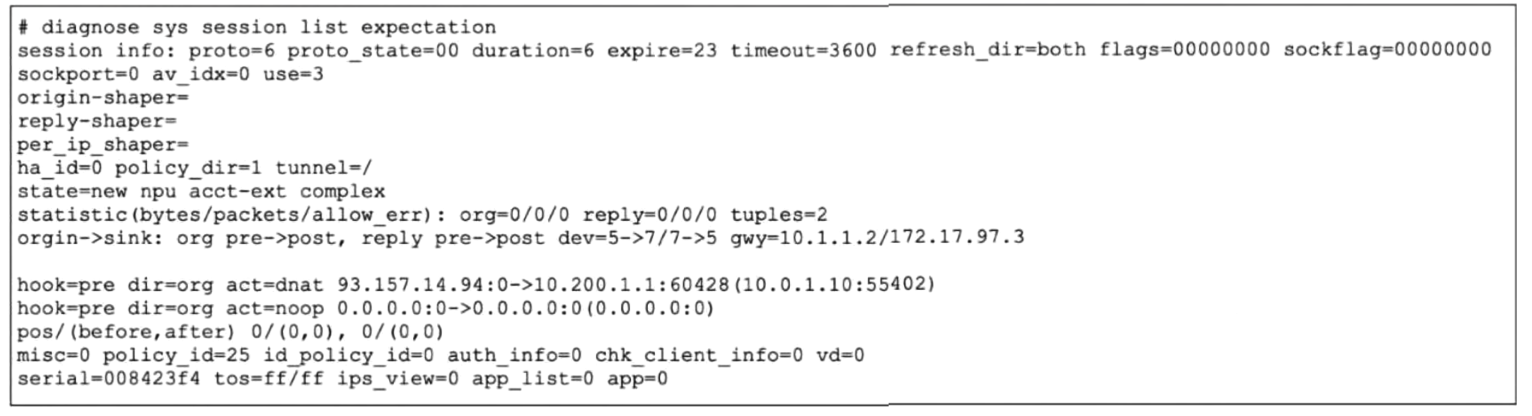
Refer to the exhibit.

Partial output from a diagnose command
Question Image

A partial output of a diagnose command is displayed. Which two conclusions can you draw from the output in the exhibit?

Choose two
  • A FortiGate will drop the expected traffic if it does not arrive within 23 seconds.
  • B The packets that belong to this session are checked against firewall policy ID 25.
  • C The TCP session is not established.
  • D This is a pinhole session to allow traffic for a TCP protocol that dynamically assigns TCP ports.
Explanation

An expectation session is a pseudo-session created by a session helper for dynamically negotiated ports. Its expire=23 value is the remaining timeout; if no matching traffic arrives before the expectation expires, FortiGate removes it and closes the dynamic pinhole. The TCP protocol and the dynamic translated port identify this as a pinhole for a protocol that negotiates additional TCP ports. The displayed policy_id is inherited from the parent session and does not show that matching traffic is evaluated against that firewall policy.

Learn more

Community Discussion

No comments yet. Be the first to start the discussion!

QuestionQ3

Routing

Which two protocol states show that traffic is bidirectional?

Choose two
  • A proto_state=05 for a TCP session.
  • B proto_state=01 for a TCP session.
  • C proto_state=01 for a UDP session.
  • D proto_state=00 for an ICMP session.
Explanation

For FortiGate sessions, TCP proto_state=01 denotes an established TCP connection. UDP proto_state=01 denotes that a reply has been seen. Each state confirms traffic in both directions.

Learn more

Community Discussion

No comments yet. Be the first to start the discussion!

QuestionQ4

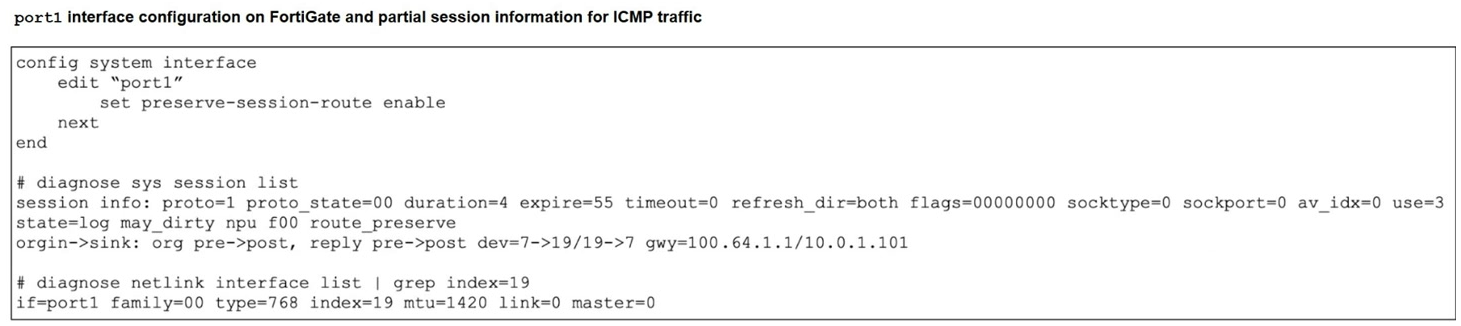
Routing

Refer to the exhibits.

Exhibit 1 –

Question Image

Exhibit 2 –

Question Image

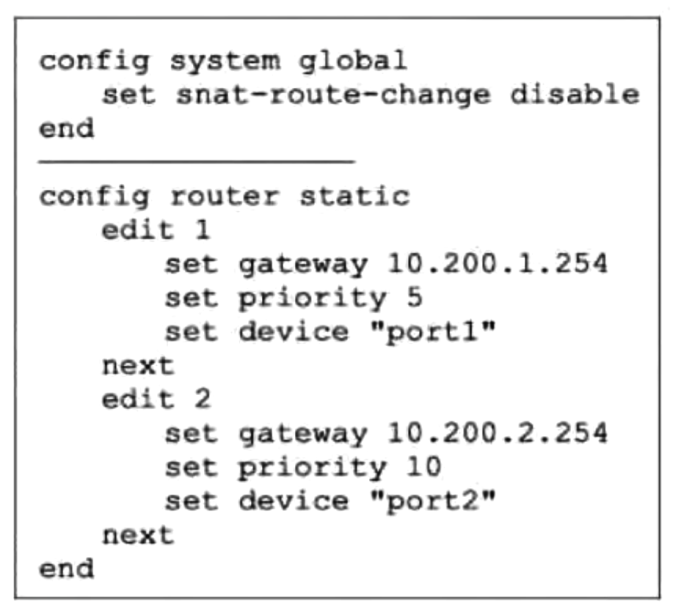
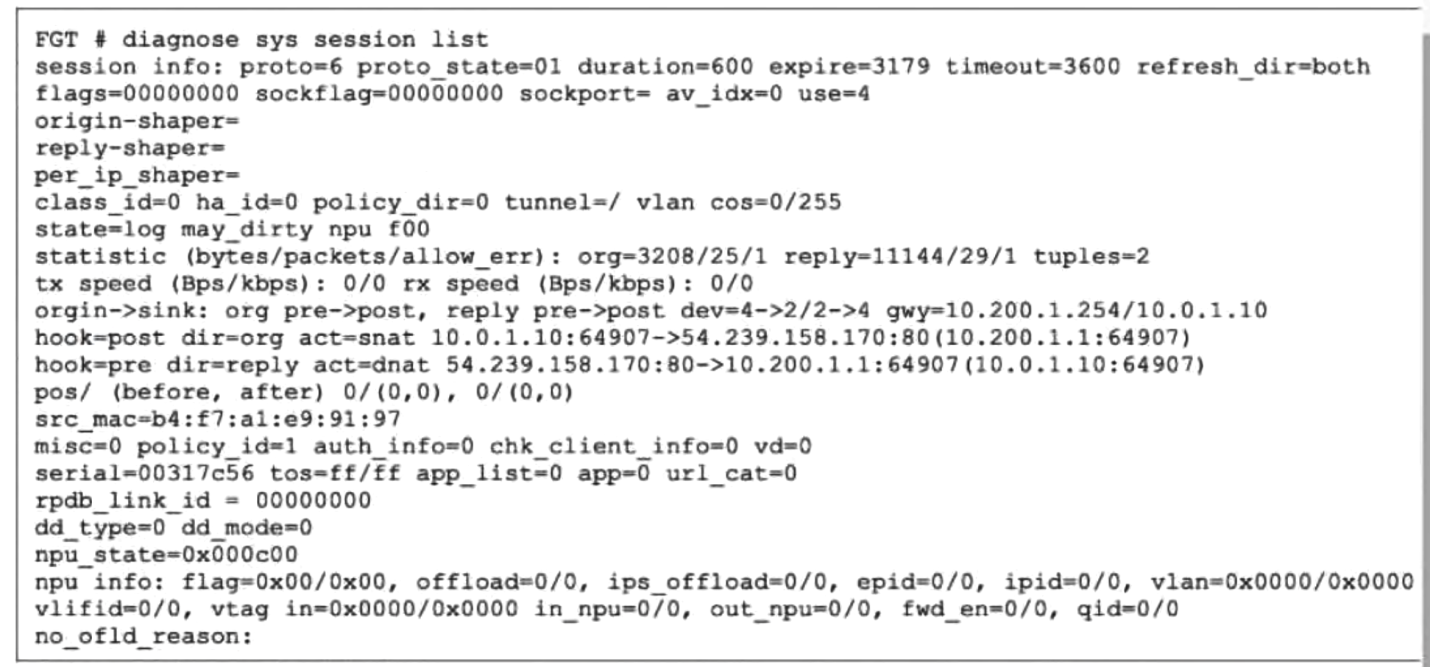
The FortiGate configuration and partial Internet-session information for a user on the internal network are displayed.

An administrator wants to test session failover between the two service-provider connections. Which two changes must the administrator make to force this existing session to immediately begin using the other interface?

Choose two
  • A Modify the distance of the port1 route to 1.
  • B Change the priority of the port1 static route to 11.
  • C Configure set snat-route-change enable.
  • D Change the priority of the port2 static route to 5.
Explanation

With equal route distances, the static route with the lower priority is preferred; therefore, changing port1's priority from 5 to 11 makes the port2 route with priority 10 preferred. SNAT sessions normally keep their original outbound interface when the old route remains active. Enabling snat-route-change causes a new route lookup after the routing change and applies new SNAT, allowing the existing session to use port2.

Learn more

Community Discussion

No comments yet. Be the first to start the discussion!

QuestionQ5

Routing

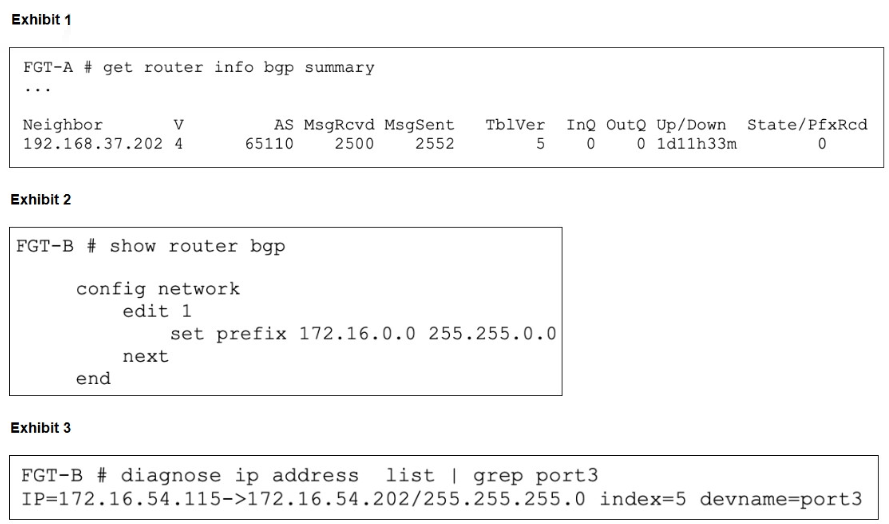
Refer to the exhibits.

Question Image

An administrator is trying to advertise the network configured on port3, but FGT-A is not receiving the prefix.

Which two actions can the administrator perform to resolve this issue?

Choose two
  • A Modify the prefix using the network command and specify le 16 to include the 172.16.54.0/24 subnet.
  • B Modify the prefix using the network command from 172.16.0.0/16 to 172.16.54.0/24.
  • C Use the set network-import-check disable command.
  • D Restart BGP using a soft reset to force both peers to exchange their complete BGP routing tables.

Explanation

The BGP network statement must exactly match a route in the routing table when network-import-check is enabled. Port3 has the connected route 172.16.54.0/24, not 172.16.0.0/16. Advertising can therefore be enabled either by configuring 172.16.54.0/24 in the BGP network statement or by disabling network-import-check, which allows the configured network to be advertised without a matching IGP route.

Learn more

Community Discussion

No comments yet. Be the first to start the discussion!
Know a question that should be here? Contribute to this exam
Back home