What command will allow the BIG-IP Administrator to view the configured management IP of a BIG-IP?
Atmsh list net self
Btmsh list sys management-route
Ctmsh show sys management-ip
Dtmsh list sys management-ip
0
Question 2
Apply procedural concepts required to manage software images
0
Question 3
Securing BIG-IP
0
Question 4
Explain the processes of licensing, license reactivation, and license modification
0
Question 5
Identify management connectivity configurations
0
That's the end of the Preview
This exam has 46 community-verified practice questions. Create a free account to access all questions, comments, and explanations.
Topics covered:
Securing BIG-IPIdentify management connectivity configurationsExplain the processes of licensing, license reactivation, and license modificationApply procedural concepts required to manage software imagesIdentify which modules are licensed and/or provisioned
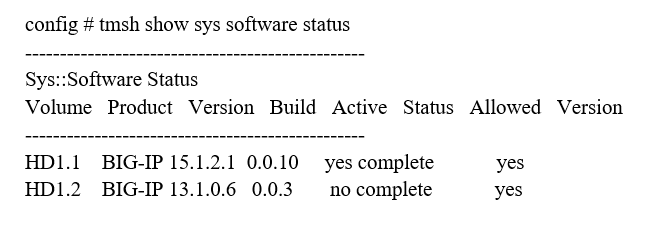
Which command will display the current active volume on a BIG-IP system?
Atmsh show sys version
Btmsh show sys software status
Ctmsh list sys software update
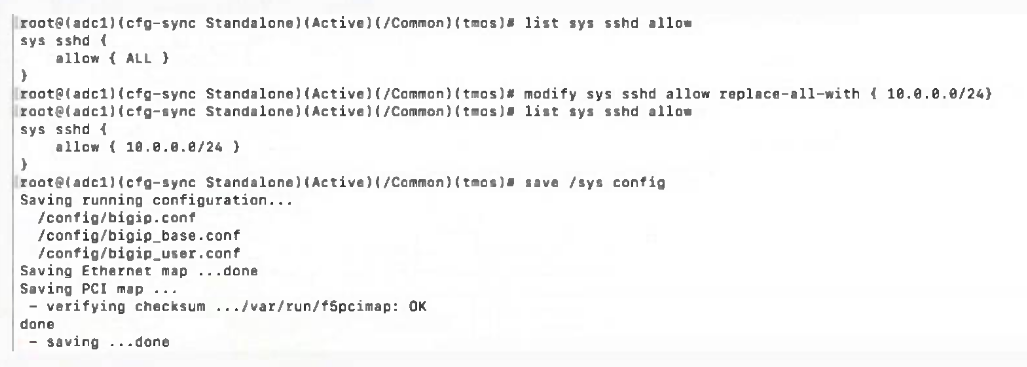
Refer to the Exhibit.
In order to configure allowed IP addresses for SSH access to a BIG-IP device, the BIG-IP Administrator has issued the commands shown in the exhibit.
Which IP addresses will have SSH access after issuing the shown commands? (Choose two.)
A100.0.0.10
B10.0.0.254
C100.0.1.10
D10.0.0.256
E10.0.0.100
An organization is planning to upgrade a BIG-IP system from 16.1.x to 17.1.x. For a successful upgrade, the Service Check Date must be equal or newer than the License Check Date of 17.1.x.
Which command will show the Service Check Date on the BIG-IP system being upgraded?
The BIG-IP Administrator received a ticket that an authorized user is attempting to connect to the Configuration Utility from a jump host and is being denied.
The HTTPD Allow configuration is:
The jump host IP is 172.28.32.22.
What command should the BIG-IP Administrator use to allow HTTPD Access for this host?
Apply procedural concepts required to manage software images
0
Question 7
Explain the processes of licensing, license reactivation, and license modification
Question 8
Identify management connectivity configurations
Question 9
Explain the processes of licensing, license reactivation, and license modification
Question 10
Securing BIG-IP
Question 11
Identify which modules are licensed and/or provisioned
Question 12
Securing BIG-IP
Question 13
Identify management connectivity configurations
Question 14
Apply procedural concepts required to manage software images
Question 15
Securing BIG-IP
Question 16
Apply procedural concepts required to manage software images
Question 17
Identify management connectivity configurations
Question 18
Apply procedural concepts required to manage software images
Question 19
Apply procedural concepts required to manage software images
Ask AstroTutor
0
Ask AstroTutor
0
Ask AstroTutor
0
Ask AstroTutor
0
Ask AstroTutor
0
Ask AstroTutor
0
Ask AstroTutor
0
Ad
Want a break from the ads?
Become a Supporter and enjoy a completely ad-free experience, plus unlock Learn Mode, Exam Mode, AstroTutor AI, and more.
Ask AstroTutor
0
Ask AstroTutor
0
Ask AstroTutor
0
Ask AstroTutor
0
Ask AstroTutor
0
Ask AstroTutor
0
A BIG-IP Administrator needs to install a HotFix on a standalone BIG-IP device, which has HD1.1 as the Active Boot Location. The BIG-IP Administrator has already re-activated the license and created an UCS archive of the configuration.
In which sequence should the BIG-IP Administrator perform the remaining steps?
AInstall HotFix in HD1.2, Install base Image in HD1.2, Activate HD1.2
BInstall HotFix in HD1.1, Reboot the BIG-IP device, Install UCS Archive
CInstall base Image in HD1.2, Install HotFix in HD1.2, Activate HD1.2
DActivate HD1.2, Install base Image in HD1.2, Install HotFix in HD1.2
When is the License Service check date enforced on a BIG-IP system?
AAfter editing a virtual server
BDuring a software install
CDuring system startup
A BIG-IP Administrator needs to verify the state of equipment in the data center. A BIG-IP appliance has a solid yellow indicator on the status LED.
How should the administrator interpret this LED indicator?
AAppliance is halted or in End-User Diagnostic (EUD) mode.
BAppliance is a standby member in a device group.
CA power supply is NOT operating properly.
DA warning-level alarm condition is present.
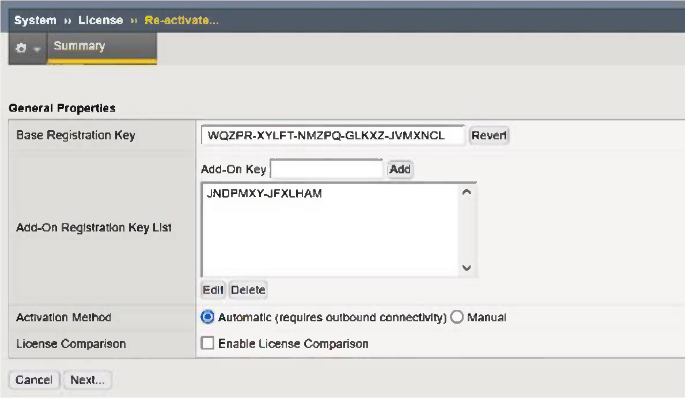
Refer to the Exhibit.
An administrator is in the process of reactivating the license using the interface displayed in the exhibit.
What is the address of the license server to which the BIG-IP device must be able to establish an outbound connection in order to use the Automatic Activation Method?
Aask.f5.com
Bactivate.f5.com
Ccallhome.f5.com
Dlicense.f5.com
Which one of the following is a port and protocol combination allowed by the Allow Default setting for port lockdown?
ATCP 80
BUDP 8443
CTCP 443
A BIG-IP device is licensed for LTM, ASM, APM, and AFM. Currently, it will only be used for load balancing and web application firewalling.
To ensure optimal performance and efficient resource utilization, which of the following module provisioning combinations is the best choice?
The Port Lockdown feature prevents unwanted connection attempts to a self-ip.
Which types of three connection attempts are unaffected by the port lockdown settings?
BCentralized Management Infrastructure (CMI), Secure SHell (SSH), Internet Control Message Protocol (ICMP)
CDefined virtual server traffic, Internet Control Message Protocol (ICMP), Centralized Management Infrastructure (CMI)
A new logging solution is being implemented on the network. Policy requires keeping management traffic sent from the BIG-IP out the management interface. After configuring the BIG-IP to forward messages to the new Syslog server the BIG-IP Administrator notices that packets are coming from a numbered BIG-IP interface.
What should the BIG-IP Administrator change to send the traffic out of the correct interface?
ASet the Management IP as the source address when configuring a Remote Syslog destination.
BCreate a Management Route for the specific address/subnet of the syslog service via TMSH.
CCreate a new Self IP in the same subnet as the management IP address using a route domain.
DModify the port lockdown settings on the Self IP address to allow UDP port 514 traffic.
A BIG-IP Administrator upgrades the BIG-IP LTM to a newer software version. After the administrator reboots into the new volume, the configuration fails to load.
Why is the configuration failing to load?
AThe upgrade was performed on the standby unit.
BThe license needed to be reactivated before the upgrade.
CA minimum of at least two reboots is required.
DConnectivity to the DNS server failed to be established.
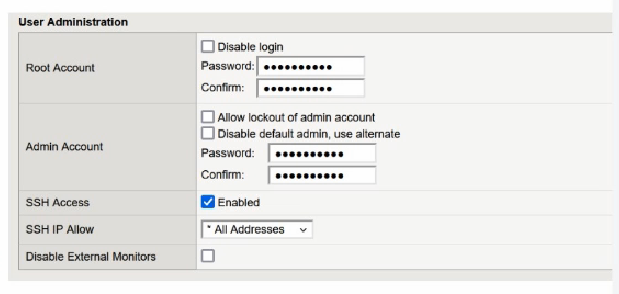
A BIG-IP Administrator discovers malicious brute-force attempts to access the BIG-IP device on the management interface via SSH. The BIG-IP Administrator needs to restrict SSH access to the management interface.
Where should this be accomplished?
ANetwork > Interfaces
BNetwork > Self IPs
CSystem > Configuration
DSystem > Platform
Given that BIGIP-<version>.iso and Hotfix-BIGIP-<version>-ENG.iso have been uploaded to /shared/images of an F5 device.
What would be the appropriate tmsh command to prepare and update the F5 device with the hotfix of a software version on a new volume e.g. HD1.2?
A secondary administrator has been granted access to a BIG-IP device managed through its Management Interface, but is unable to access the Configuration Utility (WebUI).
What command can be run from the CLI to capture the network traffic on the management interface and troubleshoot the issue? (Choose two.)
Atcpdump -i eth0 -n port 443
Btcpdump -i mgmt -n port 443
Ctcpdump -i 0.0 -n port 443
Dtcpdump -i tun0 -n port 443
Etcpdump -i management -n port 443
A BIG-IP Administrator is using Secure Copy Protocol (SCP) to transfer a TMOS image to the BIG-IP system in preparation for an upgrade. To what directory should the file be transferred to?
A/var/images/
B/shared/images/
C/local/images/
Which two items demonstrate the creation of a new volume for software images? (Choose two.)
AUsing the GUI, go to System > Disk Management > select new volume. In the pop-up window, type the name or number of the new volume and click Apply.
EUsing the GUI, go to System > Software Management > select Available Images and select Install. In the install software image pop-up window, type the name or number of the new volume and select Install.