QuestionQ17

Management and Troubleshooting

Question Image

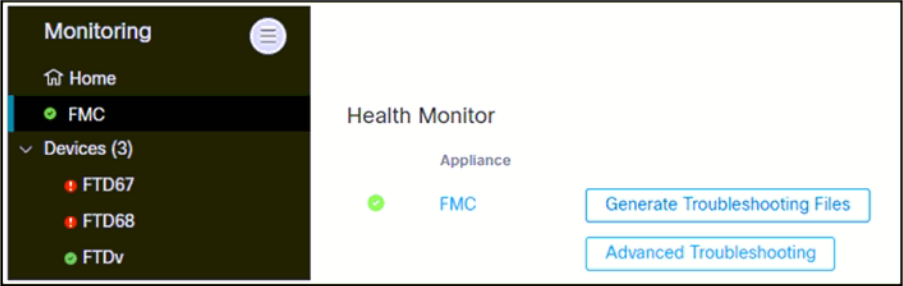
Refer to the exhibit. An engineer generates troubleshooting files in Cisco Secure Firewall Management Center (FMC). A task that completed successfully is removed before the files are downloaded. Which two actions are required to identify the filename and retrieve the generated troubleshooting files without generating them again?

Choose two
  • A Connect to CLI on the FTD67 and FTD68 devices and copy the files from flash to the FTP server.
  • B Go to expert mode on Secure FMC, list the contents of /var/common, and determine the correct filename from the output.
  • C Use an FTP client in expert mode on Secure FMC to upload the files to the FTP server.
  • D Go to the same screen as shown in the exhibit, click Advanced Troubleshooting, enter the filename, and then start the download.
  • E Click System, Monitoring, then Audit to determine the correct filename from the line containing the Generate Troubleshooting Files string.
Explanation

The Audit log entry for the Generate Troubleshooting Files operation identifies the generated filename. In Advanced Troubleshooting, the File Download feature accepts that filename and downloads the existing troubleshooting archive, so regeneration is unnecessary. Cisco documents that web-generated troubleshooting files are stored on FMC and that Advanced Troubleshooting downloads a file by entering its filename.

Learn more

Community Discussion

No comments yet. Be the first to start the discussion!