QuestionQ59
VerifiedMulticast RoutingSIMULATION
This lab item requires you to complete tasks on virtual devices.
- Use the Tasks tab to review the tasks for this lab item.
- Use the Topology tab to access device console(s) and complete the tasks.
- Console access is available for all required devices by selecting a device icon or its tab above the console window.
- All required initial configurations are already applied.
- Do not modify any device hostname or enable password.
- Save configurations to NVRAM before proceeding to the next item.
- Select Next at the bottom of the screen to submit the lab and proceed to the next question.
- After Next is selected, the lab closes and cannot be reopened.
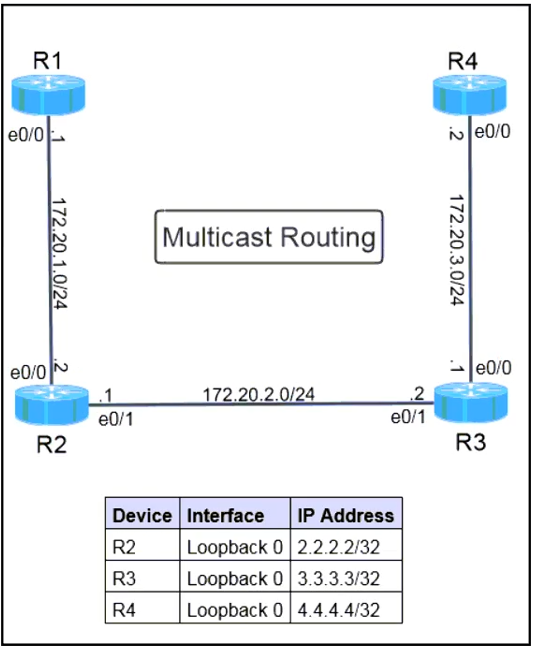
Topology
Tasks
R2 and R3 are the routers that perform multicast operations. Complete the following configuration and verification tasks on R1, R2, and R3.
- Configure R2 and R3 so they can process, route, and forward multicast packets.
- Configure R3 as the root of the shared tree for the any-source multicast domain.
- Configure R1 as the receiver for group 239.100.100.1, and ensure that a ping to that group from R4 succeeds.
Initial IP addressing is complete. Do not change configurations except as necessary to meet the listed tasks. Use a non-proprietary protocol where required. Use only the provided logical interface for the applicable task.
Community Discussion