QuestionQ94
VerifiedVPN TechnologiesSIMULATION
Guidelines
This lab item requires tasks to be completed on virtual devices.
- Use the Tasks tab to see the tasks for this lab item.
- Use the Topology tab to open device consoles and complete the tasks.
- Console access for every required device is available by selecting its device icon or the tab above the console window.
- All required preconfigurations are already applied.
- Do not modify any device hostname or enable password.
- Do not replace existing routing policies or configurations.
- Save each configuration to NVRAM before proceeding to the next item.
- Select Next at the bottom of the screen to submit the lab and continue to the next question.
- After Next is selected, the lab closes and cannot be reopened.
Topology
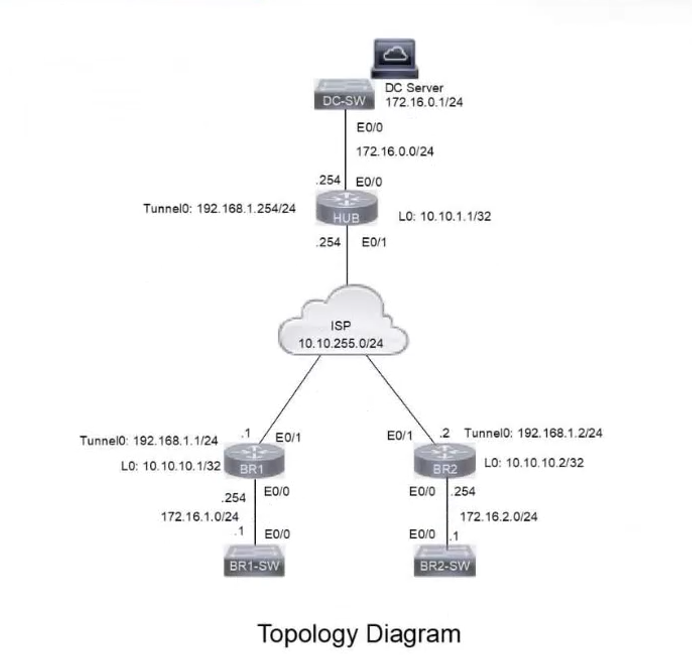
Tasks
A DMVPN network has been preconfigured with Tunnel0 address 192.168.1.254 on the HUB, IP connectivity, crypto policies, profiles, and EIGRP AS 100. The NHRP password is ccnp123, and both the network ID and tunnel key are the EIGRP ASN. Do not add a static route. Using the physical interface as the tunnel source, configure DMVPN connectivity from BR1 and BR2 to the HUB to meet these goals:
- On BR1, configure NHRP authentication, static IP-to-NBMA mappings, a five-minute hold time, the network ID, and the server.
- On BR2, configure NHRP authentication, static IP-to-NBMA mappings, a five-minute hold time, the network ID, and the server.
- On both branch tunnel interfaces, ensure fragmentation occurs before encryption to accommodate GRE and IPsec headers, and permit a maximum TCP segment size of 1360 with a tunnel IP MTU of 1400.
- Apply an IPsec profile to the tunnel. Use traceroute to the Ethernet0/0 IP address to verify a direct spoke-to-spoke tunnel between BR1 and BR2 for full credit.
Community Discussion