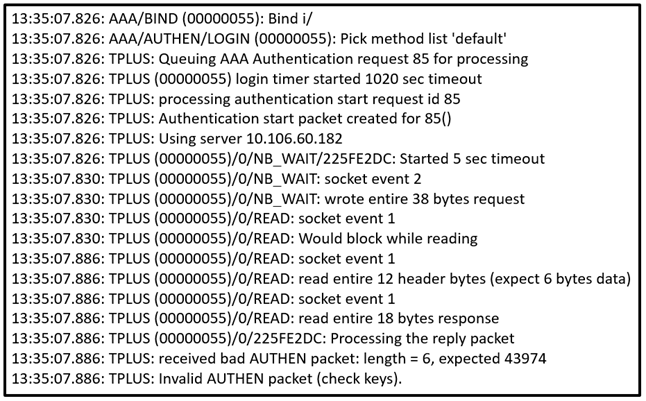
QuestionQ10Verified/Infrastructure SecurityCopy linkReport a problemAsk AstroTutorSave question Refer to the exhibit. Which action corrects the authentication problem?AConfigure the same password between the TACACS+ server and router.BConfigure the TCP port 49 to be reachable by the router.CConfigure the UDP port 1812 to be allowed on the TACACS+ server.DConfigure the user name on the TACACS+ server.Show AnswerAnswerExplanationA TACACS+ shared secret mismatch prevents the router from correctly decrypting the authentication packet, producing the invalid AUTHEN packet and incorrect expected-length error. Configuring the same password (shared key) on the TACACS+ server and router resolves the failure.Learn moreCisco: Troubleshoot TACACS Authentication IssuesShow comments1Show commentsCommunity DiscussionNo comments yet. Be the first to start the discussion!
Community Discussion