QuestionQ55
VerifiedUnderstanding and Using APIs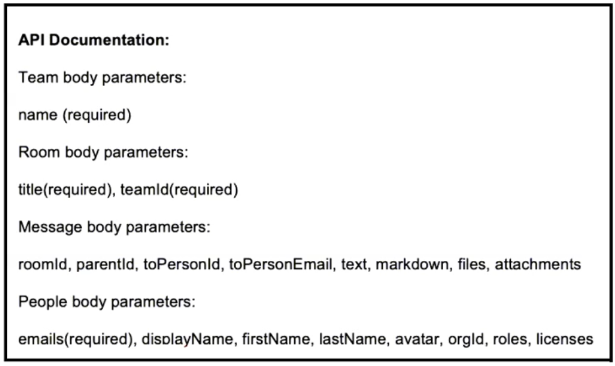
Refer to the exhibit. A script must create a new team, create a new space, send a message, and create a participant. Drag the code snippets from the bottom into the boxes in the code to complete the script. Not every option is used.
Drag & Drop
import requests base_url = “https://webexapis.com/v1” email = “admin@example.com” name = “Admin” header = {“key”: “value”} url = “{}/{}”.format(base_url, “/teams”) body = team_id = requests.post(url, headers=header, data=body).json() [‘id’] url = “{}/{}”.format(base_url, “/rooms”) body = team_id = requests.post(url, headers=header, data=body).json() [‘id’] url = “{}/{}”.format(base_url, “/messages”) body = requests.post(url, headers=header, data=body) url = “{}/{}”.format(base_url, “/people”) body = requests.post(url, headers=header, data=body)
Community Discussion