About the Exam

This entry-level exam validates foundational knowledge and skills related to IT support tasks, including queue and time management, documentation, troubleshooting, assisting end users, managing computer components, and identifying security threats. It is intended for candidates preparing for entry-level IT support roles such as help desk support, end user support, or computer support specialist. Passing demonstrates readiness for the Cisco Certified Support Technician (CCST) IT Support certification.

Exam Topics

  • Queue and Time Management20%
  • Documentation20%
  • Troubleshooting30%
  • Assisting End Users15%
  • Managing Computer Components10%
  • Identifying Security Threats5%

How to Use This Practice Exam

  1. Browse — Read each question, select your answer, and reveal the explanation.
  2. Exam Mode — Simulate real exam conditions with a timed session and score report.
  3. Learn Mode — Spaced repetition schedules questions you struggle with for long-term retention.

Download the Full Exam PDF

Get every question and answer in a clean, printable PDF built for offline study. Purchase once, keep permanent access, and re-download the latest version anytime.

Last updated December 5, 2025 at 5:40 PM

Topic filter
Question status
Question sort
Questions per page

QuestionQ1

VerifiedAssisting End Users

A user has low storage on an iPhone.

You need to advise the user how to increase the available storage.

For each of the following statements, select Yes if the statement is true. Otherwise, select No.

Yes or No
StatementsYesNo
Offload unused apps.
Empty the Recently Deleted album.
Enable Optimize Photos.
Explanation

Offloading unused apps frees the storage used by the app while retaining its documents and data. Items in Recently Deleted remain recoverable for 30 days, so permanently removing them frees their occupied space. Optimize iPhone Storage keeps space-saving copies on the device while full-resolution originals are stored in iCloud.

Learn more

Community Discussion

No comments yet. Be the first to start the discussion!

QuestionQ2

VerifiedAssisting End Users

An employee is having difficulty using Google Drive to store Microsoft Office files that they create and edit on their PC with custom templates. Company policy encourages every employee to store files in Google Drive, which is available through the company’s Google Workspace subscription.

What should you recommend to help the employee manage files on Google Drive more easily?

Explanation

Google Drive for desktop lets users access Drive files from their computer, continue editing Microsoft Office files in Office, and automatically sync saved changes to Google Drive. This preserves the employee’s existing Office-and-template workflow while meeting the company storage policy.

Learn more

Community Discussion

No comments yet. Be the first to start the discussion!

QuestionQ3

VerifiedIdentifying Security Threats

A user who has been away on vacation for the last 30 days calls the help desk and reaches you. The user reports the following:

> Before leaving for vacation, I changed my password and confirmed that it worked. My password is not scheduled to be reset for another 60 days, but I cannot log in to the network.

While the user was away, the company introduced a Multi-Factor Authentication (MFA) requirement.

Which two actions could you take to resolve the issue?

Note: Each correct answer is a complete solution.

Choose two
Explanation

A newly enforced MFA policy requires the user to enroll a second authentication factor before signing in. A company authenticator app can supply that factor, and a registered phone number can supply it through SMS validation; either method independently satisfies the MFA enrollment need.

Community Discussion

No comments yet. Be the first to start the discussion!

QuestionQ4

VerifiedTroubleshooting

A help desk technician uses Windows Device Manager to troubleshoot a hardware problem reported by a user.

Which indicator identifies a device that may be malfunctioning?

Explanation

A yellow triangle with an exclamation point indicates that Device Manager has detected a problem with the device and assigned it a problem code. The device’s Properties dialog provides the associated error message and code.

Learn more

Community Discussion

No comments yet. Be the first to start the discussion!

QuestionQ5

VerifiedManaging Computer Components

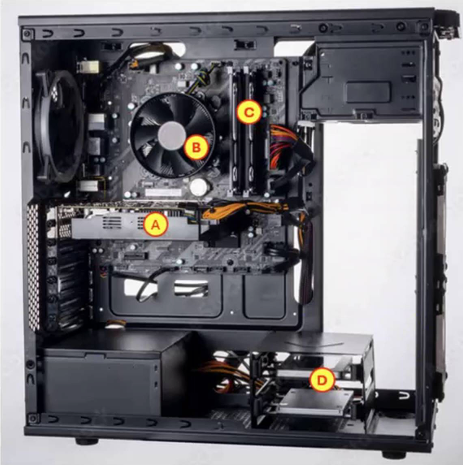
A newly hired employee at your company has just completed onboarding. She contacts you to report that her virtual machine is very slow. You suspect that her machine needs additional resources allocated to it.

How can the virtual machine be configured with additional resources?
Explanation

Virtual-machine resources are configured by the hypervisor software, which controls the virtual hardware allocated to each guest machine. The guest operating system cannot independently add its own CPU, memory, or other virtual hardware resources.

Community Discussion

No comments yet. Be the first to start the discussion!
Know a question that should be here? Contribute to this exam
Back home