QuestionQ47
Managing Privacy, Security, and SharingRefer to this image to answer the question.
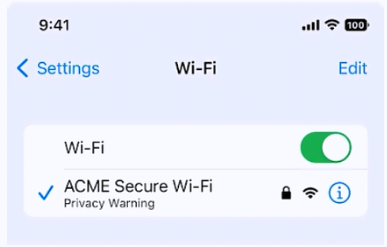
What does this iPhone Privacy Warning message signify?
- A Limit IP Address Tracking is disabled for this network
- B iOS has detected a spoofed MAC address on the network
- C Private Wi-Fi Address is disabled for this network
- D Local network access is enabled for a third-party app
Community Discussion