Troubleshoot infrastructure and configuration issues
An existing Adobe Commerce website is being moved to a headless implementation.
The existing site includes an All Brands page and separate pages for every brand. All brand-related pages are cached in Varnish with tags, in the same way as products and categories.
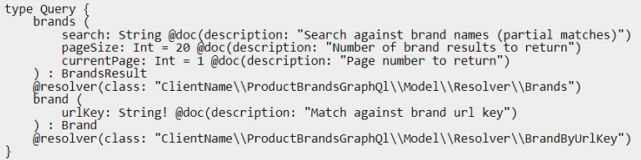
Two new GraphQL queries have been created to expose this information to the frontend for the new headless implementation:
During testing, the queries occasionally return stale information. How should this issue be resolved while preserving performance?
Community Discussion
No comments yet. Be the first to start the discussion!
Community Discussion