QuestionQ111

VerifiedVariables and Arguments

A developer has created an automation workflow that consists of:

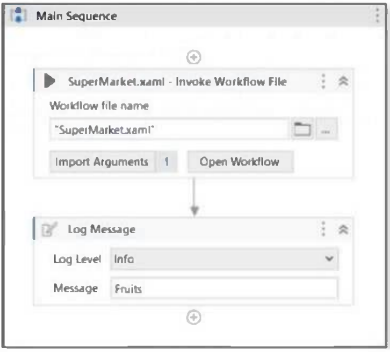
  1. A Main.xaml file:

Question Image

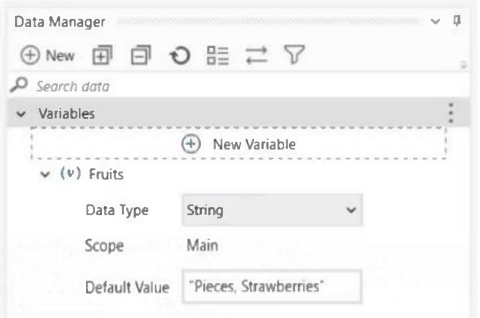
  1. The Variables panel in the Main.xaml file:

Question Image

  1. Main.xaml invokes the SuperMarket workflow with the following argument:
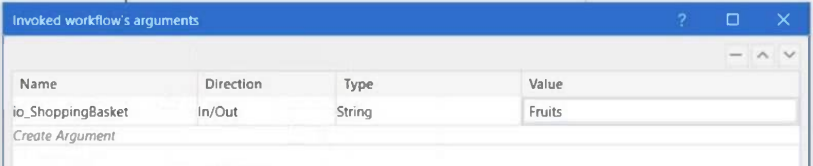
Question Image

  1. The detailed SuperMarket sequence and the right-hand-side expression shown below:
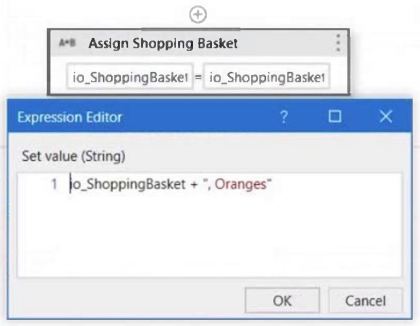
Question Image

Based on the information in the exhibits, what is the output of the Write Line activity in the Main.xaml file?

Explanation

A String In/Out argument passes the caller’s variable into the invoked workflow and returns its changed value to that variable. The assignment appends , Oranges to the initial value Pieces, Strawberries, so the caller variable becomes Pieces, Strawberries, Oranges before it is written. UiPath documents that arguments pass data between automations and that their direction determines where the stored information goes.

Learn more

Community Discussion

No comments yet. Be the first to start the discussion!