QuestionQ123
Create and configure Power AppsYou are developing a canvas app that connects to Microsoft Dataverse. You add the Accounts table as a data source for the app and implement a gallery to display information from the Accounts table.
The Accounts table is saved and cached locally in a collection named collAccounts. The gallery data must always show accounts that have a name value. The gallery uses the following Power Fx formula:
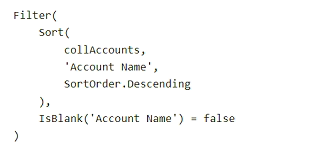
You deploy the app to production.
Users report that the app does not show the expected number of Account rows.
You need to fix the user issue.
How should you modify the Power Fx formula?
- A Sort(Accounts, 'Account Name', SortOrder.Descending)
- B Sort(collAccounts, 'Account Name', SortOrder.Descending)
- C Filter(Sort(Accounts, 'Account Name', SortOrder.Descending), IsBlank('Account Name') = false)
- D collAccounts
Community Discussion