You have an Azure Databricks account containing one workspace, Workspace1, which is enabled for Unity Catalog.
Data-access events for Unity Catalog tables do not appear in the logs. Ensure that every data-access event is captured centrally for auditing and that the log data is available for analysis as soon as possible.
What should you do?
Select
Enable audit logging for:
Send audit logs to:
Community Discussion
No comments yet. Be the first to start the discussion!
You have an Azure Databricks workspace enabled for Unity Catalog that contains two Delta tables, Table1 and Table2, with the same data type.
Table1 has a column named Column1. Table2 has a column named Column2.
You execute the following query:
SELECT Colum1 -

FROM Table1 -

GROUP BY Column1 -

HAVING COUNT(*) > 1 -

INTERSECT -

SELECT Column2 -

FROM Table2 -

GROUP BY Column2 -
HAVING COUNT(*) > 1;
What happens when the query is executed?
Community Discussion
No comments yet. Be the first to start the discussion!
This is a case study. Case studies are not separately timed from other exam sections. You may use as much of the exam time as needed to complete each case study. However, additional case studies or exam sections might follow. Manage your time so that you can complete all exam sections in the available time. Watch the Exam Progress indicator at the top of the screen to ensure sufficient time remains for any subsequent sections.
To answer the case-study questions, refer to the information provided in the case. Case studies and their related questions can include exhibits or other resources that provide more scenario information. Information in one individual question does not apply to other questions in the case study.
A Review Screen appears at the end of this case study. From that screen, you can review and change answers before proceeding to the next exam section. After you leave this case study, you cannot return to it.
To begin the case study, select the “Next” button to show its first question. A menu to the left of the question links to information including business requirements, the existing environment, and problem statements. Read all of this information before answering questions. When ready to answer, select the “Question” button to return to the question.
Overview
Company Information
Contoso, Inc. is a renewable-energy provider operating solar and wind farms throughout North America.
Existing Environment
Azure Environment
Contoso has one Azure Databricks workspace, named Workspace1, in the West US Azure region. Unity Catalog is enabled for Workspace1.
Workspace1 has all-purpose clusters for development and production workloads.
The company’s Azure environment includes:
Azure event hubs in the West US, Central US, and East US Azure regions that stream telemetry data, plus an Azure Data Lake Storage Gen2 account in each region for every hub.
One Azure SQL database in West US that hosts enterprise resource planning (ERP) data.
One Azure Database for PostgreSQL server in West US that stores operational maintenance data.
Data Environment
Contoso ingests the following business and operational data:
Telemetry data: More than 40,000 IoT sensors at 28 sites emit JSON telemetry events every few seconds. Each site sends events to its nearest event hub, which writes them to the corresponding Data Lake Storage Gen2 account. These files often have schema drift.
Maintenance logs: Maintenance systems create historical repair logs, daily incremental updates, technician notes, and unstructured attachments in the Data Lake Storage Gen2 accounts.
Operational maintenance data: Structured operational maintenance data is stored on the Azure Database for PostgreSQL server.
External weather data: Hourly weather forecasts are retrieved from a REST API and written to the Data Lake Storage Gen2 accounts.
ERP data: Daily CSV extracts of 50 to 100 GB contain equipment metadata, work orders, and purchase-order information.
Problem Statements
The existing analytics environment has several issues.
Ingestion:
Telemetry pipelines lag during peak loads.
Telemetry ingestion fails when schema drift occurs.
Streaming pipelines reprocess events after a pipeline restart.
Compute:
Production and development workloads use the same all-purpose clusters.
Production and development workloads do not support autoscaling or workload isolation.
Governance:
ERP data is duplicated across systems and development teams.
Development teams, regions, and products use inconsistent naming conventions.
IoT-sensor ownership changes over time, and analysts must retain the complete ownership history.
Equipment manufacturers sometimes need to correct equipment-name data-entry errors; historical values are not required.
Pipeline operations:
Pipelines lack resiliency, alerting, and centralized scheduling.
Requirements
Planned Changes
Contoso plans to:
Implement scalable data-pipeline orchestration.
Create a managed analytics catalog in Unity Catalog.
Establish a consistent method for creating curated datasets.
Establish centralized governance across ingestion, cleansed, and curated layers.
Give data engineers access to ERP tables with minimal development effort.
Use a compute strategy that isolates production workloads and supports autoscaling.
Adopt a slowly changing dimension (SCD) approach to address current data-modeling issues.
Technical Requirements
Environment and compute requirements:
Ensure production ingestion workloads use compute clusters that automatically scale during telemetry spikes.
Deliver fast, consistent performance for business intelligence (BI) workloads.
Keep development activity from affecting production pipelines.
Run production ingestion workloads as scheduled, non-interactive pipelines instead of shared interactive development clusters.
Data ingestion and processing requirements:
Automatically scale ingestion pipelines for bursty workloads.
Handle schema drift for maintenance and telemetry data.
Ingest file-based telemetry data with minimal operational effort.
Store all ingested data in a format supporting incremental processing.
Continuously ingest telemetry from the event hubs with exactly-once semantics.
Ingest structured maintenance data from the Azure Database for PostgreSQL server.
Build a telemetry pipeline that ingests raw event-hub events, cleanses them, and publishes curated tables to Unity Catalog.
Ensure Apache Spark Structured Streaming pipelines that read from the event hubs write to a managed Delta table named telemetry.raw_events. The pipelines must support schema drift and resume after failures without reprocessing data.
Data-modeling and optimization requirements:
Build curated tables that standardize business logic.
Overwrite changed equipment-metadata attributes, including name, manufacturer, model, and commissioning date. Historical values are not required.
Pipeline deployment and operation requirements:
Orchestrate multi-step ingestion and transformation workflows.
Define a clear execution order and dependencies.
Automatically retry failed steps and notify operators.
Consistently schedule ingestion and transformation workloads.
Governance Requirements
Contoso must:
Centralize the metadata catalog.
Provide isolated development areas that use standard naming conventions.
Establish a consistent structure for raw, cleansed, and curated data.
Provide a read-only way to reference ERP data through a foreign catalog.
Business Requirements
Contoso must improve ingestion reliability and reduce operational effort, and standardize data definitions across development teams.
Which ingestion option should be recommended for each data source? Each option may be used once, more than once, or not at all.
Drag & Drop
Telemetry data:
Operational maintenance data:
Maintenance logs:
External weather data:
Community Discussion
No comments yet. Be the first to start the discussion!
Save question
You have an Azure Databricks job named Job1 with an ingestion task called Task1 and a transformation task called Task2.
Ensure that if Task1 fails, it retries automatically and Task2 does not run. How should Job1 be configured?
Select
Failure handling behavior:
Retry configuration:
Community Discussion
No comments yet. Be the first to start the discussion!
Save question
Your company includes sales, finance, and HR departments.
You have an Azure Databricks workspace enabled for Unity Catalog. You need to implement Unity Catalog to meet the following requirements:
Access to Unity Catalog for each department must be managed independently of the other departments.
Each department’s data assets must be logically isolated from those of the other departments.
The solution must support centralized governance.
What should you do for each department?
Community Discussion
No comments yet. Be the first to start the discussion!
Save question
You have an Azure Databricks workspace containing a Lakeflow Jobs job named Job1. Job1 runs hourly. At times, a job run takes more than one hour to finish. Overlapping runs must be avoided to prevent data corruption.
You need to configure the job’s scheduling behavior. What should you configure?
Select
Concurrency setting:
Execution behavior:
Community Discussion
No comments yet. Be the first to start the discussion!
You have an Azure Databricks workspace named Workspace1 that uses a Git repository. The repository includes a Databricks notebook named Notebook1.
From the main branch, you create a feature branch named Branch1 and commit changes to Notebook1. Another user commits changes to Notebook1 on main.
When you try to merge Branch1 into main, the merge fails because of conflicts.
You need to merge Branch1 into the main branch. The solution must ensure that Notebook1 contains all changes from both branches.
What should you do?
Community Discussion
No comments yet. Be the first to start the discussion!
Save question
You have an Azure Databricks workspace attached to a Unity Catalog metastore named metastore1. metastore1 contains:
A catalog named Sales
A schema named Customers in the Sales catalog
A table named Customer_details in the Customers schema
You need to ensure that a user named User1 can update data in Customer_details. The solution must meet these requirements:
Ensure that User1 cannot create new tables.
Follow the principle of least privilege.
Which permission should you grant to User1 for each object?
Select
The Sales catalog:
The Customers schema:
The Customer_details table:
Community Discussion
No comments yet. Be the first to start the discussion!
Save question
HOTSPOT -
You have an Azure Databricks workspace enabled for Unity Catalog. You plan to run the following PySpark code.
For each of the following statements, select Yes if the statement is true. Otherwise, select No.
Yes or No
Statements
Yes
No
When a new element is found in the source data, the element will be written to table1 successfully.
The streaming process will resume from a failure without data loss.
Data will be written to a JSON file.
Community Discussion
No comments yet. Be the first to start the discussion!
Save question
You have an Azure Databricks workspace that includes several all-purpose clusters.
You find that some clusters stay idle for extended periods after users complete their work.
You need to lower compute costs without impacting active workloads. What should you do?
Community Discussion
No comments yet. Be the first to start the discussion!
Save question
You have an Azure Databricks workspace enabled for Unity Catalog containing a Delta table named db1.sales_orders. The table is updated nightly and has change data feed (CDF) enabled.
You must ingest every change from db1.sales_orders—inserts, updates, and deletes—into a downstream pipeline.
Complete the PsySpark code segment by selecting the appropriate options.
No comments yet. Be the first to start the discussion!
Save question
Overview
Company Information
Contoso, Inc. is a renewable energy provider operating solar and wind farms across North America.
Existing Environment
Azure Environment
Contoso has a single Azure Databricks workspace named Workspace1 in the West US Azure region. Workspace1 is enabled for Unity Catalog.
Workspace1 contains all-purpose clusters for both development and production workloads.
The company’s Azure environment includes:
In the West US, Central US, and East US Azure regions, Azure event hubs that stream telemetry data and an Azure Data Lake Storage Gen2 account in each region for each hub
A single Azure SQL database in the West US region that hosts enterprise resource planning (ERP) data
An Azure Database for PostgreSQL server in the West US region that stores operational maintenance data
Data Environment
Contoso ingests the following operational and business data:
Telemetry data: More than 40,000 IoT sensors across 28 sites emit JSON telemetry events every few seconds. Each site sends the events to the nearest event hub, which writes the data into the corresponding Data Lake Storage Gen2 account. These files often experience schema drift.
Maintenance logs: Maintenance systems produce historical repair logs, daily incremental updates, technician notes, and unstructured attachments that are stored in the Data Lake Storage Gen2 accounts.
Operational maintenance data: Structured operational maintenance data is stored on the Azure Database for PostgreSQL server.
External weather data: Hourly weather forecasts are retrieved from a REST API and written to the Data Lake Storage Gen2 accounts.
ERP data: Daily CSV extracts of 50 to 100 GB contain equipment metadata, work orders, and purchase order information.
Problem Statements
The company’s current analytics environment has several issues:
Ingestion
Telemetry pipelines fall behind during peak loads.
Telemetry ingestion fails when schema drift occurs.
Streaming pipelines reprocess events after a pipeline restarts.
Compute
Production and development workloads run on the same all-purpose clusters.
Production and development workloads do NOT support autoscaling or workload isolation.
Governance
The ERP data is duplicated across systems and development teams.
Naming conventions are inconsistent across development teams, regions, and products.
Ownership of the IoT sensors changes over time, and analysts must track the full history of the ownership.
Occasionally, equipment manufacturers must correct data-entry mistakes in equipment names. Historical values are NOT required.
Pipeline operations
Pipelines lack resiliency, alerting, and centralized scheduling.
Requirements
Planned Changes
Contoso plans to implement the following changes:
Implement scalable data pipeline orchestration.
Create a managed analytics catalog in Unity Catalog.
Implement a consistent approach to creating curated datasets.
Establish a centralized governance model across ingestion, cleansed, and curated layers.
Grant data engineers access to the ERP tables by using minimal development effort.
Adopt a compute strategy that isolates production workloads and supports autoscaling.
Adopt a slowly changing dimension (SCD) approach to address current data modeling issues.
Technical Requirements
Contoso identifies the following environment and compute requirements:
Ensure that production ingestion workloads run on compute clusters that can scale automatically during telemetry spikes.
Provide fast and consistent performance for business intelligence (BI) workloads.
Prevent development activity from affecting production pipelines.
Production ingestion workloads must run as scheduled, non-interactive pipelines rather than on shared interactive development clusters.
Contoso identifies the following data ingestion and processing requirements:
Auto-scale ingestion pipelines to handle bursty workloads.
Handle schema drift for the maintenance and telemetry data.
Ingest file-based telemetry data by using minimal operational effort.
Store all ingested data in a format that supports incremental processing.
Support the continuous ingestion of telemetry data from the event hubs by using exactly-once semantics.
Support the ingestion of the structured maintenance data from the Azure Database for PostgreSQL server.
Build a new telemetry pipeline that ingests raw events from the event hubs, cleanses the data, and publishes curated tables to Unity Catalog.
Ensure that the Apache Spark Structured Streaming pipelines reading from the event hubs write the data into a managed Delta table named telemetry.raw_events. The pipelines must support schema drift and resume processing after failures without reprocessing the data.
Contoso identifies the following data modeling and optimization requirements:
Build curated tables that standardize business logic.
Overwrite equipment metadata attributes, such as name, manufacturer, model, and commissioning date, when the attributes change. Historical values are NOT required.
Contoso identifies the following pipeline deployment and operation requirements:
Orchestrate multi-step ingestion and transformation workflows.
Define a clear execution order and dependencies.
Automatically retry failed steps and notify operators.
Schedule ingestion and transformation workloads consistently.
Governance Requirements
Contoso identifies the following governance requirements:
Centralize the metadata catalog.
Provide isolated development areas that follow standard naming conventions.
Establish a consistent structure for organizing raw, cleansed, and curated data.
Provide a read-only mechanism to reference the ERP data through a foreign catalog.
Business Requirements
Contoso identifies the following business requirements:
Improve ingestion reliability and reduce operational effort.
Standardize data definitions across development teams.
You need to configure compute for telemetry-data ingestion. The solution must satisfy the data ingestion and processing requirements.
What should you do?
Community Discussion
No comments yet. Be the first to start the discussion!
Overview
Company Information
Contoso, Inc. is a renewable energy provider operating solar and wind farms across North America.
Existing Environment
Azure Environment
Contoso has a single Azure Databricks workspace named Workspace1 in the West US Azure region. Workspace1 is enabled for Unity Catalog.
Workspace1 contains all-purpose clusters for both development and production workloads.
The company’s Azure environment includes:
In the West US, Central US, and East US Azure regions, Azure event hubs that stream telemetry data and an Azure Data Lake Storage Gen2 account in each region for each hub
A single Azure SQL database in the West US region that hosts enterprise resource planning (ERP) data
An Azure Database for PostgreSQL server in the West US region that stores operational maintenance data
Data Environment
Contoso ingests the following operational and business data:
Telemetry data: More than 40,000 IoT sensors across 28 sites emit JSON telemetry events every few seconds. Each site sends the events to the nearest event hub, which writes the data into the corresponding Data Lake Storage Gen2 account. These files often experience schema drift.
Maintenance logs: Maintenance systems produce historical repair logs, daily incremental updates, technician notes, and unstructured attachments that are stored in the Data Lake Storage Gen2 accounts.
Operational maintenance data: Structured operational maintenance data is stored on the Azure Database for PostgreSQL server.
External weather data: Hourly weather forecasts are retrieved from a REST API and written to the Data Lake Storage Gen2 accounts.
ERP data: Daily CSV extracts of 50 to 100 GB contain equipment metadata, work orders, and purchase order information.
Problem Statements
The company’s current analytics environment has several issues:
Ingestion
Telemetry pipelines fall behind during peak loads.
Telemetry ingestion fails when schema drift occurs.
Streaming pipelines reprocess events after a pipeline restarts.
Compute
Production and development workloads run on the same all-purpose clusters.
Production and development workloads do NOT support autoscaling or workload isolation.
Governance
The ERP data is duplicated across systems and development teams.
Naming conventions are inconsistent across development teams, regions, and products.
Ownership of the IoT sensors changes over time, and analysts must track the full history of the ownership.
Occasionally, equipment manufacturers must correct data-entry mistakes in equipment names. Historical values are NOT required.
Pipeline operations
Pipelines lack resiliency, alerting, and centralized scheduling.
Requirements
Planned Changes
Contoso plans to implement the following changes:
Implement scalable data pipeline orchestration.
Create a managed analytics catalog in Unity Catalog.
Implement a consistent approach to creating curated datasets.
Establish a centralized governance model across ingestion, cleansed, and curated layers.
Grant data engineers access to the ERP tables by using minimal development effort.
Adopt a compute strategy that isolates production workloads and supports autoscaling.
Adopt a slowly changing dimension (SCD) approach to address current data modeling issues.
Technical Requirements
Contoso identifies the following environment and compute requirements:
Ensure that production ingestion workloads run on compute clusters that can scale automatically during telemetry spikes.
Provide fast and consistent performance for business intelligence (BI) workloads.
Prevent development activity from affecting production pipelines.
Production ingestion workloads must run as scheduled, non-interactive pipelines rather than on shared interactive development clusters.
Contoso identifies the following data ingestion and processing requirements:
Auto-scale ingestion pipelines to handle bursty workloads.
Handle schema drift for the maintenance and telemetry data.
Ingest file-based telemetry data by using minimal operational effort.
Store all ingested data in a format that supports incremental processing.
Support the continuous ingestion of telemetry data from the event hubs by using exactly-once semantics.
Support the ingestion of the structured maintenance data from the Azure Database for PostgreSQL server.
Build a new telemetry pipeline that ingests raw events from the event hubs, cleanses the data, and publishes curated tables to Unity Catalog.
Ensure that the Apache Spark Structured Streaming pipelines reading from the event hubs write the data into a managed Delta table named telemetry.raw_events. The pipelines must support schema drift and resume processing after failures without reprocessing the data.
Contoso identifies the following data modeling and optimization requirements:
Build curated tables that standardize business logic.
Overwrite equipment metadata attributes, such as name, manufacturer, model, and commissioning date, when the attributes change. Historical values are NOT required.
Contoso identifies the following pipeline deployment and operation requirements:
Orchestrate multi-step ingestion and transformation workflows.
Define a clear execution order and dependencies.
Automatically retry failed steps and notify operators.
Schedule ingestion and transformation workloads consistently.
Governance Requirements
Contoso identifies the following governance requirements:
Centralize the metadata catalog.
Provide isolated development areas that follow standard naming conventions.
Establish a consistent structure for organizing raw, cleansed, and curated data.
Provide a read-only mechanism to reference the ERP data through a foreign catalog.
Business Requirements
Contoso identifies the following business requirements:
Improve ingestion reliability and reduce operational effort.
Standardize data definitions across development teams.
You need to finish the PySpark code for the Spark Structured Streaming pipelines. The solution must satisfy the data-ingestion and processing requirements.
No comments yet. Be the first to start the discussion!
Save question
Overview
Company Information
Contoso, Inc. is a renewable energy provider operating solar and wind farms across North America.
Existing Environment
Azure Environment
Contoso has a single Azure Databricks workspace named Workspace1 in the West US Azure region. Workspace1 is enabled for Unity Catalog.
Workspace1 contains all-purpose clusters for both development and production workloads.
The company’s Azure environment includes:
In the West US, Central US, and East US Azure regions, Azure event hubs that stream telemetry data and an Azure Data Lake Storage Gen2 account in each region for each hub
A single Azure SQL database in the West US region that hosts enterprise resource planning (ERP) data
An Azure Database for PostgreSQL server in the West US region that stores operational maintenance data
Data Environment
Contoso ingests the following operational and business data:
Telemetry data: More than 40,000 IoT sensors across 28 sites emit JSON telemetry events every few seconds. Each site sends the events to the nearest event hub, which writes the data into the corresponding Data Lake Storage Gen2 account. These files often experience schema drift.
Maintenance logs: Maintenance systems produce historical repair logs, daily incremental updates, technician notes, and unstructured attachments that are stored in the Data Lake Storage Gen2 accounts.
Operational maintenance data: Structured operational maintenance data is stored on the Azure Database for PostgreSQL server.
External weather data: Hourly weather forecasts are retrieved from a REST API and written to the Data Lake Storage Gen2 accounts.
ERP data: Daily CSV extracts of 50 to 100 GB contain equipment metadata, work orders, and purchase order information.
Problem Statements
The company’s current analytics environment has several issues:
Ingestion
Telemetry pipelines fall behind during peak loads.
Telemetry ingestion fails when schema drift occurs.
Streaming pipelines reprocess events after a pipeline restarts.
Compute
Production and development workloads run on the same all-purpose clusters.
Production and development workloads do NOT support autoscaling or workload isolation.
Governance
The ERP data is duplicated across systems and development teams.
Naming conventions are inconsistent across development teams, regions, and products.
Ownership of the IoT sensors changes over time, and analysts must track the full history of the ownership.
Occasionally, equipment manufacturers must correct data-entry mistakes in equipment names. Historical values are NOT required.
Pipeline operations
Pipelines lack resiliency, alerting, and centralized scheduling.
Requirements
Planned Changes
Contoso plans to implement the following changes:
Implement scalable data pipeline orchestration.
Create a managed analytics catalog in Unity Catalog.
Implement a consistent approach to creating curated datasets.
Establish a centralized governance model across ingestion, cleansed, and curated layers.
Grant data engineers access to the ERP tables by using minimal development effort.
Adopt a compute strategy that isolates production workloads and supports autoscaling.
Adopt a slowly changing dimension (SCD) approach to address current data modeling issues.
Technical Requirements
Contoso identifies the following environment and compute requirements:
Ensure that production ingestion workloads run on compute clusters that can scale automatically during telemetry spikes.
Provide fast and consistent performance for business intelligence (BI) workloads.
Prevent development activity from affecting production pipelines.
Production ingestion workloads must run as scheduled, non-interactive pipelines rather than on shared interactive development clusters.
Contoso identifies the following data ingestion and processing requirements:
Auto-scale ingestion pipelines to handle bursty workloads.
Handle schema drift for the maintenance and telemetry data.
Ingest file-based telemetry data by using minimal operational effort.
Store all ingested data in a format that supports incremental processing.
Support the continuous ingestion of telemetry data from the event hubs by using exactly-once semantics.
Support the ingestion of the structured maintenance data from the Azure Database for PostgreSQL server.
Build a new telemetry pipeline that ingests raw events from the event hubs, cleanses the data, and publishes curated tables to Unity Catalog.
Ensure that the Apache Spark Structured Streaming pipelines reading from the event hubs write the data into a managed Delta table named telemetry.raw_events. The pipelines must support schema drift and resume processing after failures without reprocessing the data.
Contoso identifies the following data modeling and optimization requirements:
Build curated tables that standardize business logic.
Overwrite equipment metadata attributes, such as name, manufacturer, model, and commissioning date, when the attributes change. Historical values are NOT required.
Contoso identifies the following pipeline deployment and operation requirements:
Orchestrate multi-step ingestion and transformation workflows.
Define a clear execution order and dependencies.
Automatically retry failed steps and notify operators.
Schedule ingestion and transformation workloads consistently.
Governance Requirements
Contoso identifies the following governance requirements:
Centralize the metadata catalog.
Provide isolated development areas that follow standard naming conventions.
Establish a consistent structure for organizing raw, cleansed, and curated data.
Provide a read-only mechanism to reference the ERP data through a foreign catalog.
Business Requirements
Contoso identifies the following business requirements:
Improve ingestion reliability and reduce operational effort.
Standardize data definitions across development teams.
You need to develop the task logic for a new Lakeflow Jobs job that processes telemetry data.
Each task must include only the logic appropriate to its pipeline step. The solution must support the planned changes and satisfy the data ingestion and processing requirements.
What should you do?
Community Discussion
No comments yet. Be the first to start the discussion!
Save question
Overview
Company Information
Contoso, Inc. is a renewable energy provider operating solar and wind farms across North America.
Existing Environment
Azure Environment
Contoso has a single Azure Databricks workspace named Workspace1 in the West US Azure region. Workspace1 is enabled for Unity Catalog.
Workspace1 contains all-purpose clusters for both development and production workloads.
The company’s Azure environment includes:
In the West US, Central US, and East US Azure regions, Azure event hubs that stream telemetry data and an Azure Data Lake Storage Gen2 account in each region for each hub
A single Azure SQL database in the West US region that hosts enterprise resource planning (ERP) data
An Azure Database for PostgreSQL server in the West US region that stores operational maintenance data
Data Environment
Contoso ingests the following operational and business data:
Telemetry data: More than 40,000 IoT sensors across 28 sites emit JSON telemetry events every few seconds. Each site sends the events to the nearest event hub, which writes the data into the corresponding Data Lake Storage Gen2 account. These files often experience schema drift.
Maintenance logs: Maintenance systems produce historical repair logs, daily incremental updates, technician notes, and unstructured attachments that are stored in the Data Lake Storage Gen2 accounts.
Operational maintenance data: Structured operational maintenance data is stored on the Azure Database for PostgreSQL server.
External weather data: Hourly weather forecasts are retrieved from a REST API and written to the Data Lake Storage Gen2 accounts.
ERP data: Daily CSV extracts of 50 to 100 GB contain equipment metadata, work orders, and purchase order information.
Problem Statements
The company’s current analytics environment has several issues:
Ingestion
Telemetry pipelines fall behind during peak loads.
Telemetry ingestion fails when schema drift occurs.
Streaming pipelines reprocess events after a pipeline restarts.
Compute
Production and development workloads run on the same all-purpose clusters.
Production and development workloads do NOT support autoscaling or workload isolation.
Governance
The ERP data is duplicated across systems and development teams.
Naming conventions are inconsistent across development teams, regions, and products.
Ownership of the IoT sensors changes over time, and analysts must track the full history of the ownership.
Occasionally, equipment manufacturers must correct data-entry mistakes in equipment names. Historical values are NOT required.
Pipeline operations
Pipelines lack resiliency, alerting, and centralized scheduling.
Requirements
Planned Changes
Contoso plans to implement the following changes:
Implement scalable data pipeline orchestration.
Create a managed analytics catalog in Unity Catalog.
Implement a consistent approach to creating curated datasets.
Establish a centralized governance model across ingestion, cleansed, and curated layers.
Grant data engineers access to the ERP tables by using minimal development effort.
Adopt a compute strategy that isolates production workloads and supports autoscaling.
Adopt a slowly changing dimension (SCD) approach to address current data modeling issues.
Technical Requirements
Contoso identifies the following environment and compute requirements:
Ensure that production ingestion workloads run on compute clusters that can scale automatically during telemetry spikes.
Provide fast and consistent performance for business intelligence (BI) workloads.
Prevent development activity from affecting production pipelines.
Production ingestion workloads must run as scheduled, non-interactive pipelines rather than on shared interactive development clusters.
Contoso identifies the following data ingestion and processing requirements:
Auto-scale ingestion pipelines to handle bursty workloads.
Handle schema drift for the maintenance and telemetry data.
Ingest file-based telemetry data by using minimal operational effort.
Store all ingested data in a format that supports incremental processing.
Support the continuous ingestion of telemetry data from the event hubs by using exactly-once semantics.
Support the ingestion of the structured maintenance data from the Azure Database for PostgreSQL server.
Build a new telemetry pipeline that ingests raw events from the event hubs, cleanses the data, and publishes curated tables to Unity Catalog.
Ensure that the Apache Spark Structured Streaming pipelines reading from the event hubs write the data into a managed Delta table named telemetry.raw_events. The pipelines must support schema drift and resume processing after failures without reprocessing the data.
Contoso identifies the following data modeling and optimization requirements:
Build curated tables that standardize business logic.
Overwrite equipment metadata attributes, such as name, manufacturer, model, and commissioning date, when the attributes change. Historical values are NOT required.
Contoso identifies the following pipeline deployment and operation requirements:
Orchestrate multi-step ingestion and transformation workflows.
Define a clear execution order and dependencies.
Automatically retry failed steps and notify operators.
Schedule ingestion and transformation workloads consistently.
Governance Requirements
Contoso identifies the following governance requirements:
Centralize the metadata catalog.
Provide isolated development areas that follow standard naming conventions.
Establish a consistent structure for organizing raw, cleansed, and curated data.
Provide a read-only mechanism to reference the ERP data through a foreign catalog.
Business Requirements
Contoso identifies the following business requirements:
Improve ingestion reliability and reduce operational effort.
Standardize data definitions across development teams.
You need to organize Unity Catalog in a way that meets the governance requirements.
What should you do?
Community Discussion
No comments yet. Be the first to start the discussion!
You have an Azure Databricks workspace named Workspace1 and a non-admin user, User1.
You must ensure that User1 can:
Provision clusters of any size.
Run Databricks jobs.
The solution must follow the principle of least privilege. What should you do?
Each option may be used once, more than once, or not at all.
Drag & Drop
To ensure that User1 can provision clusters:
To ensure that User1 can run jobs:
Community Discussion
No comments yet. Be the first to start the discussion!
Save question
You have an Azure Databricks workspace with Unity Catalog enabled.
You need to recommend a pipeline that ingests files from cloud storage, applies cleansing and enrichment transformations, and writes curated Delta tables for analytics. The solution must minimize development effort while providing built-in monitoring and automatic retries.
What should you include in the recommendation?
Community Discussion
No comments yet. Be the first to start the discussion!
You have an Azure Databricks workspace enabled for Unity Catalog that contains a managed Delta table named Sales.
Sales stores transaction data and has the following columns:
transaction_id (string)
transaction_date (date)
amount (decimal)
You need to implement these data-quality requirements by using table-level data-quality enforcement:
amount must be greater than 0.
transaction_id must never be null.
Invalid records must be rejected when they are written to the Sales table.
What should you do?
Community Discussion
No comments yet. Be the first to start the discussion!
Save question
You have an Azure Databricks workspace enabled for Unity Catalog.
You have a Lakeflow Spark Declarative Pipelines (SDP) pipeline that writes numerical data to a table named Table1 by using a data-quality validation rule named rule1.
You need to change rule1 to meet these requirements:
Ensure that amount is always greater than 0.
Prevent an update to Table1 from being committed when data that violates rule1 is detected.
Which statement should you execute?
Community Discussion
No comments yet. Be the first to start the discussion!
Save question
You have an Azure Databricks workspace that includes a Delta table named Table1.
Table1 has accumulated obsolete files. You need to reduce storage costs while preserving 30 days of time-travel history.
Which two actions should you take? Each correct answer presents part of the solution.
NOTE: Each correct selection is worth one point.
Choose two
Community Discussion
No comments yet. Be the first to start the discussion!
Save question
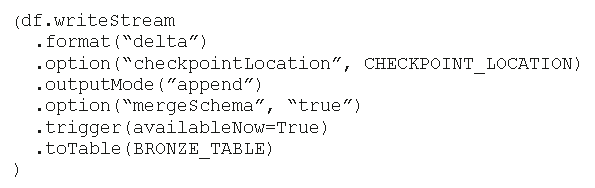
You have an Azure Databricks workspace that has Unity Catalog enabled. You plan to run the following PySpark code.
For each of the following statements, select Yes if the statement is true. Otherwise, select No.
Yes or No
Statements
Yes
No
New columns from the incoming JSON payload will be added automatically to the target Delta table.
Previously processed data will NOT be reprocessed if the pipeline fails.
Each new batch of telemetry data will overwrite the existing data in the target Delta table.
Community Discussion
No comments yet. Be the first to start the discussion!

Community Discussion