QuestionQ4

VerifiedDeploy and manage AD DS

Your network contains an Active Directory Domain Services (AD DS) domain called contoso.com.

The domain includes a user named User1 and two global security groups, Group1 and Group2. User1 belongs to both groups.

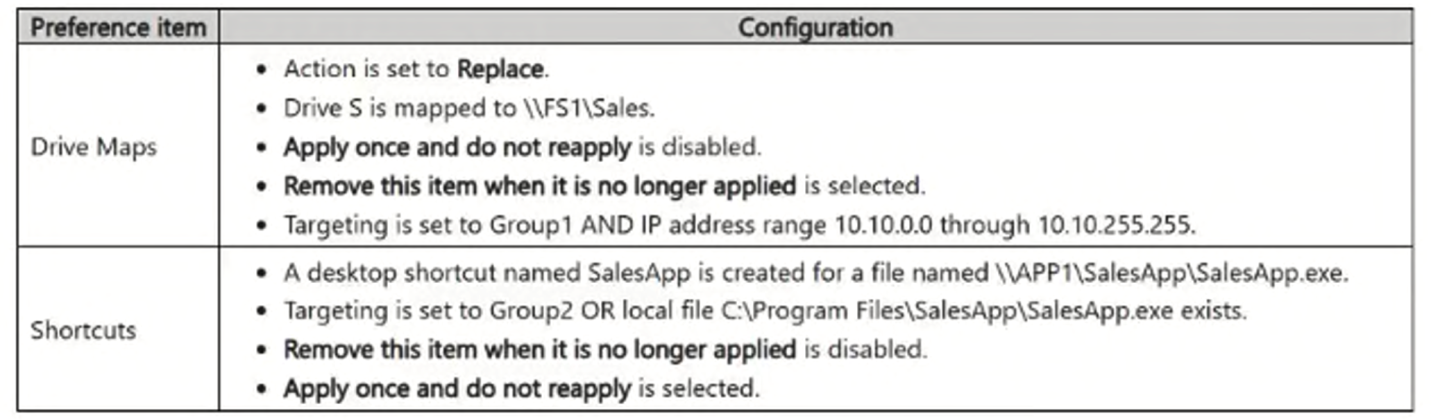
A Group Policy Object (GPO) named GPO1 is linked to the domain. GPO1 includes the following User Configuration preference items.
Question Image

For each of the following statements, select Yes if the statement is true. Otherwise, select No.

Yes or No
StatementsYesNo
If User1 signs in from 10.20.5.20, drive S will be mapped.
If User1 is removed from Group1, after sign in, the user will NOT have drive S in File Explorer.
If User1 signs in to a client computer that does NOT have C:\Program Files\SalesApp\SalesApp.exe, the SalesApp shortcut is created once and is never recreated.
Explanation

Group Policy Preferences item-level targeting evaluates every configured condition with the specified AND/OR logic, applying the preference only when the whole expression is true. The Drive Maps preference targets Group1 AND the IP address range 10.10.0.0 through 10.10.255.255, so both conditions must hold at once; a client signing in from 10.20.5.20 falls outside that range, so the AND expression is false and the drive is not mapped regardless of group membership. Because that preference item has 'Remove this item when it is no longer applied' enabled, its behavior is action-based: once a previously-matching user stops meeting the targeting criteria — for instance, after being removed from Group1 — the Group Policy client-side extension removes the mapping it had previously created the next time policy processes, leaving the user without drive S. The Shortcuts preference targets Group2 OR the presence of the local file C:\Program Files\SalesApp\SalesApp.exe, so membership in Group2 alone satisfies the targeting even when the local executable is absent, and the item applies. Because that preference item has 'Apply once and do not reapply' enabled, the client-side extension creates the shortcut the first time targeting matches and then never reprocesses that item again for the user on any later Group Policy refresh, so the shortcut is created exactly once and is never subsequently recreated, modified, or removed.

Learn more

Community Discussion

No comments yet. Be the first to start the discussion!