QuestionQ11

Deploy and manage AD DS

HOTSPOT –

Overview

Contoso, Ltd. has its main office in Seattle and branch offices in Los Angeles and Montreal.

Existing environment

AD DS environment

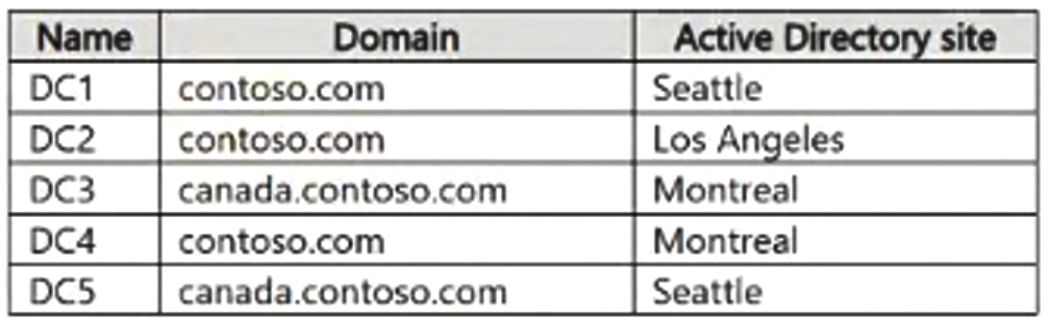
The network includes an on-premises Active Directory Domain Services (AD DS) forest named contoso.com. The forest has two domains: contoso.com and canada.contoso.com. The domain controllers are shown in the following table.
Question Image

Every domain controller is a global catalog server.

Server infrastructure

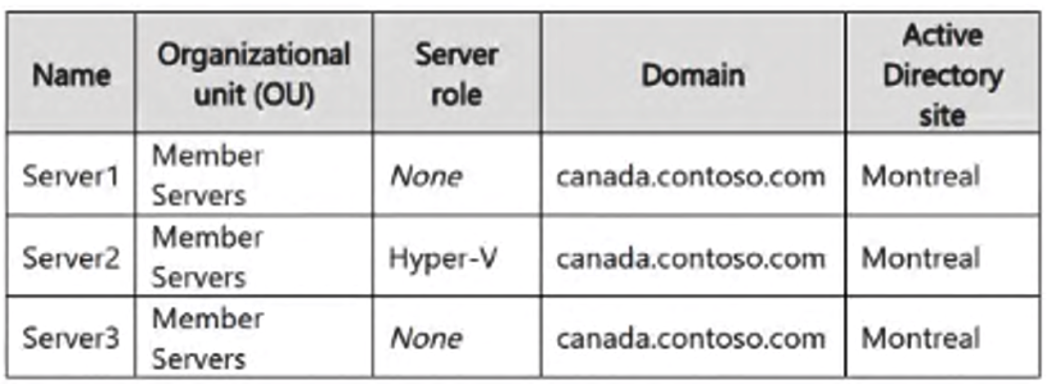
The servers are shown in the following table.
Question Image

Server4 runs Windows Server in a workgroup. Its Windows Defender Firewall uses the private profile.

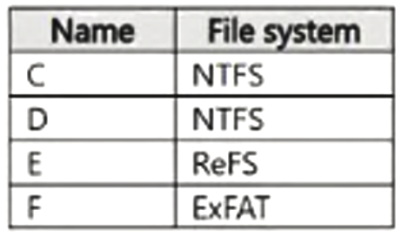
Server2 hosts three virtual machines: VM1, VM2, and VM3. VM3 is a file server whose volumes are shown in the following table.
Question Image

Group Policies

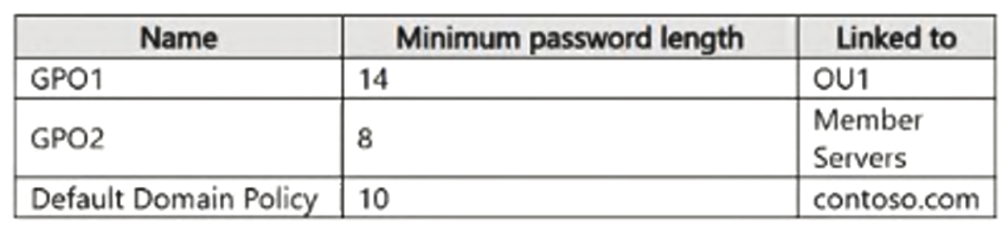
The contoso.com domain contains the GPOs shown in the following table.
Question Image

Existing identities

The forest contains the users shown in the following table.
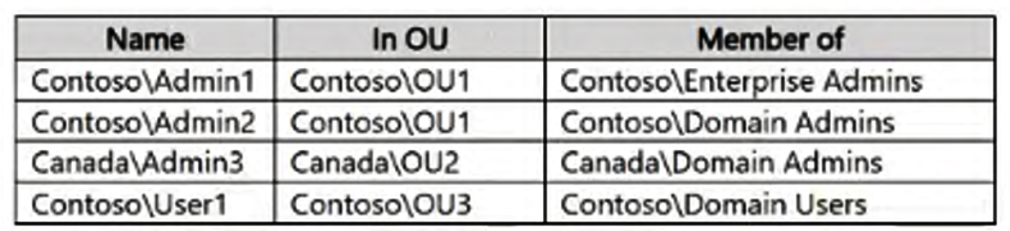
Question Image

The forest contains the groups shown in the following table.
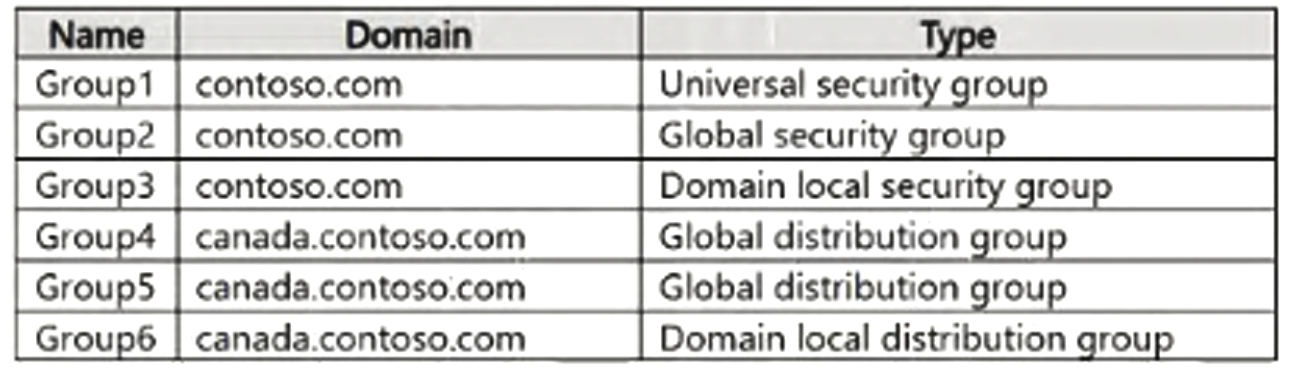
Question Image

Current problem

When an administrator signs in to the VM2 console through Virtual Machine Connection and disconnects without signing out, another administrator can connect to that console session as the already signed-in user.

Requirements

Technical requirements

Contoso has identified these technical requirements:

  • Change the replication schedule for every site link to 30 minutes.
  • Promote Server1 to a domain controller in canada.contoso.com.
  • Install and authorize Server3 as a DHCP server.
  • Ensure that User1 can manage membership of every group in Contoso\OU3.
  • Ensure that Server4 can be managed from Server1 by using PowerShell remoting.
  • Ensure that virtual machines can run on VM1.
  • Require users to enter credentials when connecting to VM2.
  • On VM3, enable Data Deduplication on every volume that supports it.

For each of the following statements, select Yes if the statement is true. Otherwise, select No.

Yes or No
StatementsYesNo
Admin1 must use a password that has at least 14 characters.
User1 must use a password that has at least 10 characters.
If Admin1 creates a new local user on Server1, the password for the new user must contain at least eight characters.
Explanation

In Active Directory Domain Services, the Password Policy, Account Lockout Policy and Kerberos Policy settings are domain-wide account policies: domain controllers always read them from the Group Policy Object linked at the root of the domain, so a single password policy governs every domain user account in that domain. Placing those same settings in a GPO linked to an organizational unit does not create a second password policy for the domain accounts inside that OU; the only supported way to give different domain users different password requirements is a fine-grained password policy (a Password Settings Object), which applies exclusively to user objects and global security groups and cannot be targeted at an OU at all. Consequently, a 14-character minimum defined in a GPO linked to the OU that holds an administrator's user account has no effect on that administrator's domain password, which remains governed by the 10-character minimum set at the domain root; and a standard domain user elsewhere in the same domain is likewise bound by that 10-character domain-root minimum.

An account policy configured below the domain level is not inert, however. Microsoft documents that when these settings are set at any level below the domain in AD DS, they affect the local accounts on the member servers concerned: the account policy settings for an OU are applied to the local security policy of every computer object contained in that OU, and are enforced whenever someone signs in with an account from that computer's own local account database. A GPO that sets a minimum password length of 8 and is linked to the OU containing the member servers therefore does control the local SAM of those servers, so a local user account created on a server in that OU must be given a password of at least eight characters, even though the same GPO cannot change the password requirements of any domain account. Note also that a member server's effective default minimum password length is only seven characters, so the eight-character requirement is the result of the OU-linked policy rather than a Windows default.

Reference: "Account Policies" and "Minimum password length" in the Windows security policy settings documentation, and "Configure fine grained password policies for Active Directory Domain Services in Windows Server" on Microsoft Learn.

Learn more

Community Discussion

No comments yet. Be the first to start the discussion!