QuestionQ16

Ensuring successful operation of a cloud solution

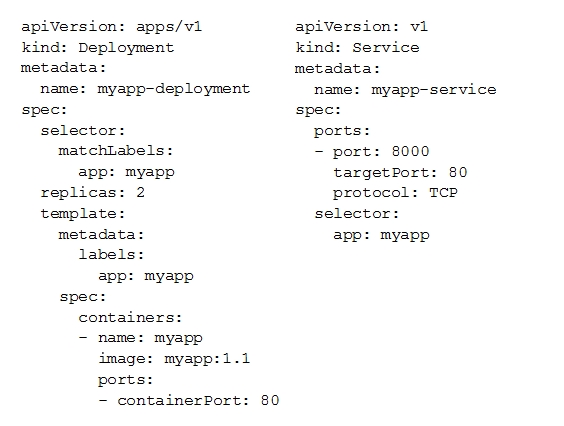
You deployed a new application inside your Google Kubernetes Engine cluster using the YAML file specified below.
Question Image

You check the status of the deployed pods and notice that one of them is still in PENDING status:

Question Image

You want to find out why the pod is stuck in pending status. What should you do?

  • A Review details of the myapp-service Service object and check for error messages.
  • B Review details of the myapp-deployment Deployment object and check for error messages.
  • C Review details of myapp-deployment-58ddbbb995-lp86m Pod and check for warning messages.
  • D View logs of the container in myapp-deployment-58ddbbb995-lp86m pod and check for warning messages.
Explanation

To debug a pod stuck in PENDING status, review the pod's detailed information using 'kubectl describe pod' and check for warning messages about scheduling constraints (insufficient resources, node selectors, etc.). The pod's events display scheduler messages explaining why it cannot be scheduled, which is more diagnostic than viewing deployment status, service details, or container logs (a PENDING pod has not been deployed to a node, so logs are unavailable).

Community Discussion

No comments yet. Be the first to start the discussion!