QuestionQ13
Central managementRefer to the exhibits.
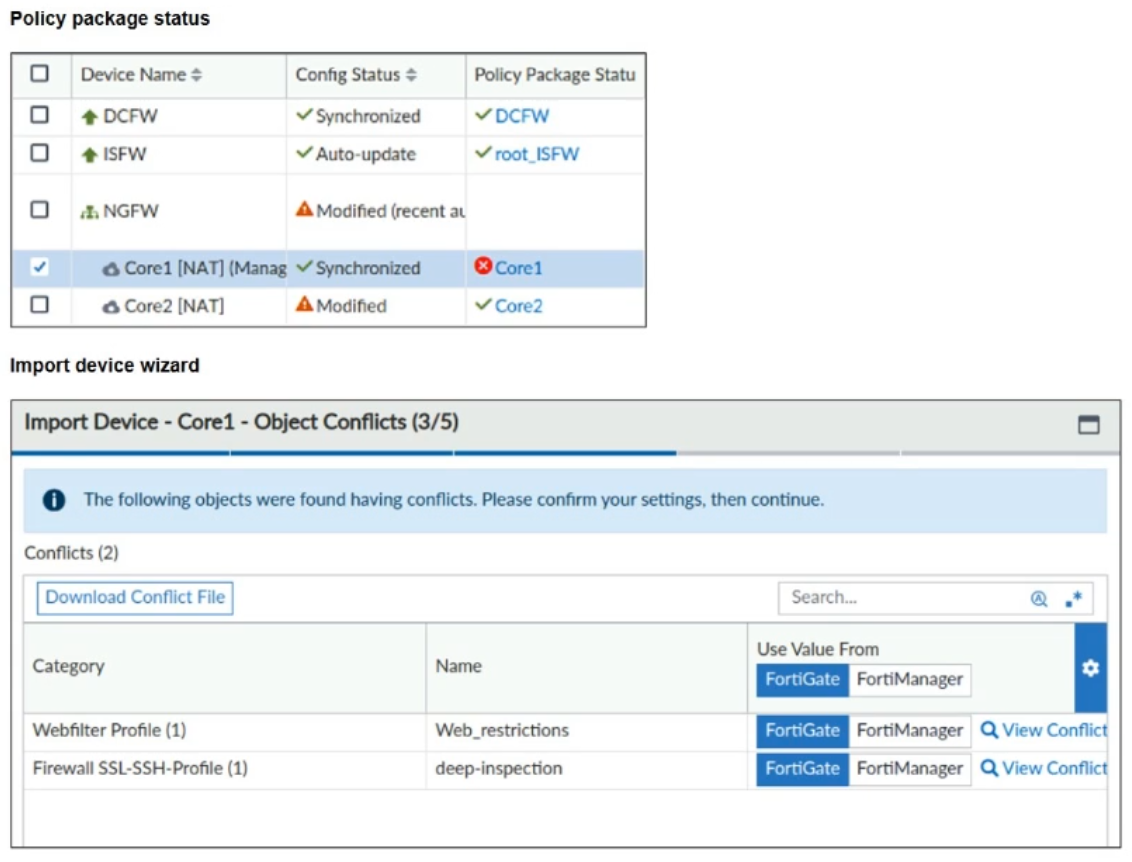
A policy-package conflict status and details from the import-device wizard in the Core1 VDOM are displayed.
When importing a policy package, the following message is shown for the Web_restrictions web filter profile and the deep-inspection SSL-SSH profile:
> The following objects were found having conflicts. Please confirm your settings, then continue.
The Web_restrictions and deep-inspection profiles are used by other FortiGate devices within FortiManager.
Which step must you take to resolve the issue?
- A Create uniquely named objects on FortiGate and reimport them into the policy package.
- B Retrieve the FortiGate configuration to automatically export correct objects and policies.
- C Use non-default object values because FortiManager is unable to alter default values.
- D Select the FortiManager configuration that accepts changes on FortiManager and preserves existing configurations on FortiGate devices.
Community Discussion