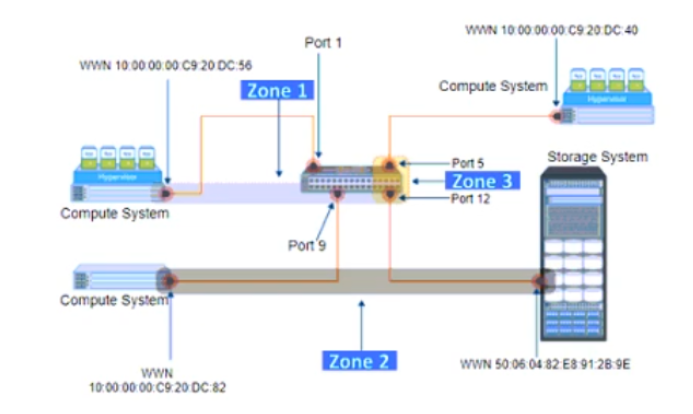
QuestionQ80Verified/Security and ManagementCopy linkReport a problemAsk AstroTutorSave questionRefer to the exhibit: Select the option that identifies the three Zone Types for each labeled zone.AZone1: WWN -Zone2: Mixed -Zone3: PortBZone1: Fabric -Zone2: WWN -Zone3: MixedCZone1: Mixed -Zone2: WWN -Zone3: PortDZone1: Port -Zone2: WWN -Zone3: FabricShow AnswerAnswerExplanationA mixed zone contains both WWN-based and switch-port-based members; Zone 1 includes device WWNs and Port 1. WWN zoning identifies members by their port WWNs, as in Zone 2. Port zoning identifies members by switch ports, as in Zone 3 with Ports 5 and 12. Cisco documents pWWN and switch-interface membership as supported zone-member types.Learn moreCisco MDS 9000 Series Fabric Configuration Guide — Fabric OverviewCisco MDS 9000 Family Cookbook — ZoningShow comments0Show commentsCommunity DiscussionNo comments yet. Be the first to start the discussion!
Community Discussion