QuestionQ5
Section 2A: Marketo Data Architecture Design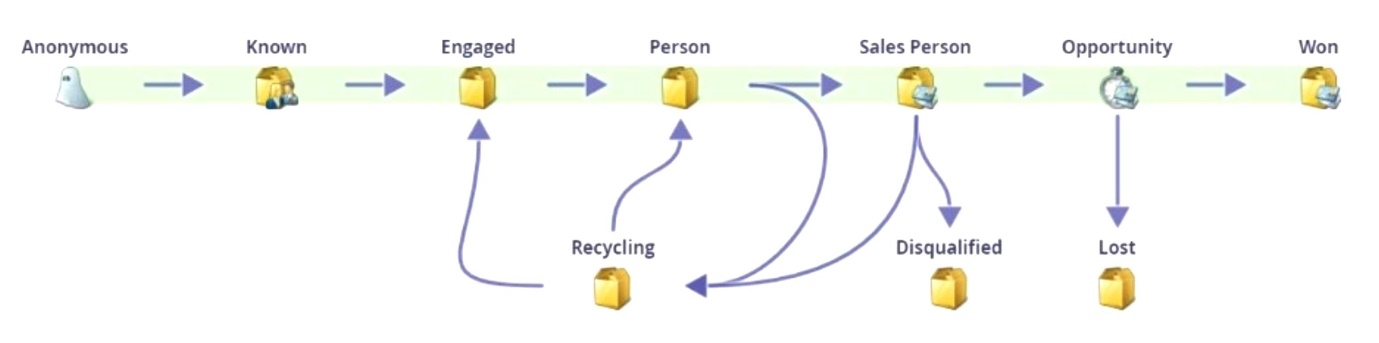
Refer to the lifecycle model shown above.
A company wants to improve the efficiency of its sales follow-up and enhance its velocity reporting across the funnel. The company currently uses the out-of-the-box Adobe Marketo Engage success path modeler. The stages are defined as follows:
- Anonymous: Leads whose web activity is tracked, but whose identity is not yet known.
- Known: Leads for whom an email address or other information is available that allows marketing to them.
- Engaged: Leads that have engaged by filling out a form, clicking a link in an email, or visiting the website at least 10 times within a week.
- Lead: Leads with scores greater than 25.
- Sales Person: Leads with scores greater than 30.
- Opportunity: Leads who also have an opportunity attached to them; the Max Age is set to 7 days before moving to "Lost."
- Won: Leads attached to opportunities that have been closed and Won.
- Recycling: People with scores below 25 who need to be nurtured.
- Disqualified: People who are not a fit for the company's products and services and should no longer be marketed to.
- Lost: People attached to opportunities that have been lost.
Once leads reach the "Sales Person" stage, 50% of them are not followed up by Sales until 7 days later. The Sales leader wants a salesperson to follow up with leads within 4 days.
Once a lead is in "Opportunity," there is an additional step a salesperson must move the lead to before it can be considered "Won" in the CRM. If the salesperson does not update the stage within 3 days, the lead should be disqualified.
Which two modifications should the Adobe Marketo Engage Consultant make to the lifecycle model to achieve these goals?
Community Discussion